Scheduled launch
Set up a launch now and let it create the token on its own at a time you pick.
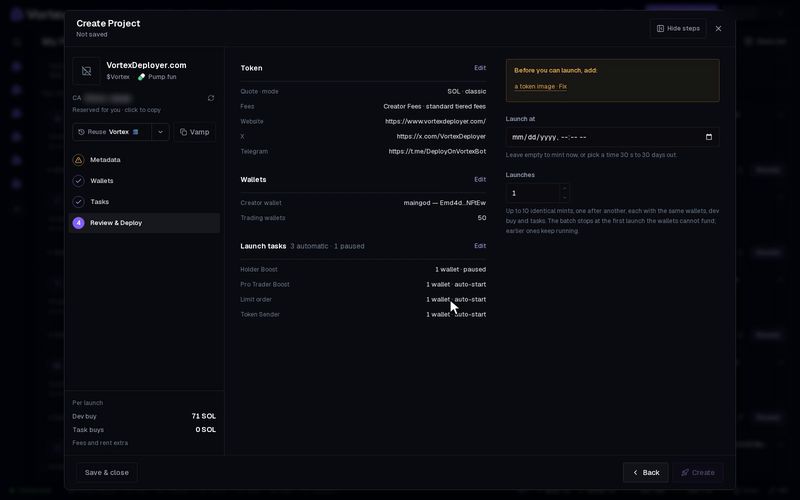
A scheduled launch is a launch you set up now that mints the token later, at a time you pick. You do not need to be online when it fires. Behind the scenes it is a task. It waits for the time, then runs the launch as if you had clicked it yourself.
Schedule a launch#
- Set up the launch in the create wizard as usual: see Create a project.
- On the last step, Review & Deploy, pick a date and time under Launch at. It uses your own time zone. It must be at least 30 seconds and at most 30 days away.
- The main button now says Schedule instead of Create. Click it.
- A message confirms it: Launch scheduled for followed by the time and the task number. The wizard closes.
The project stays a draft on the Projects page until the time comes. Its tile shows a clock and the launch time. Leave Launch at empty, or click the X beside it (Mint now instead), to launch right away.
What happens at launch time#
- It runs the same launch as the Create button: the same dev wallet, dev buy, wallets and tasks, and the same fees.
- With Launches above 1, it mints that many tokens, one after another, as a normal launch would.
- It mints once. After that the project shows its token like any other launch.
- If the launch fails at that moment, the task stops with an error and the draft stays.
Change or cancel it#
- To cancel, click Cancel schedule on the project's tile. A message says Scheduled launch cancelled; draft kept. Nothing is minted.
- To change it, cancel first. Then open the draft, make your changes and schedule it again.
The launch is saved as it was when you clicked Schedule: name, picture, wallets, amounts and tasks. Edits you make to the draft later do not change it. Cancel and schedule again instead. See Real funds & confirms.
The SOL is checked when the launch fires, not when you schedule it. If you move funds out of the dev wallet or the buyer wallets in the meantime, the launch can fail or buy less. A launch spends real SOL and cannot be undone once the token is minted.
If the launch cannot start within 10 minutes of its time (for example, the service was down), it is cancelled with an error. It never mints late. Schedule it again.
All settings#
Every option on the Scheduled launch form
scheduled_launch- Launch attextrequiredThe instant to mint (ISO-8601). Set from the create wizard — the launch is kept whole and fires on its own.
Troubleshooting#
- "missed its window" — the time passed by more than 10 minutes before it could run. Nothing was minted. Schedule it again.
- "this task already fired — a launch mints once" — this schedule already launched. Schedule a new one to mint again.