Tasks step
Add launch tasks in step 3 of the wizard, so your wallets trade the token the moment it exists.
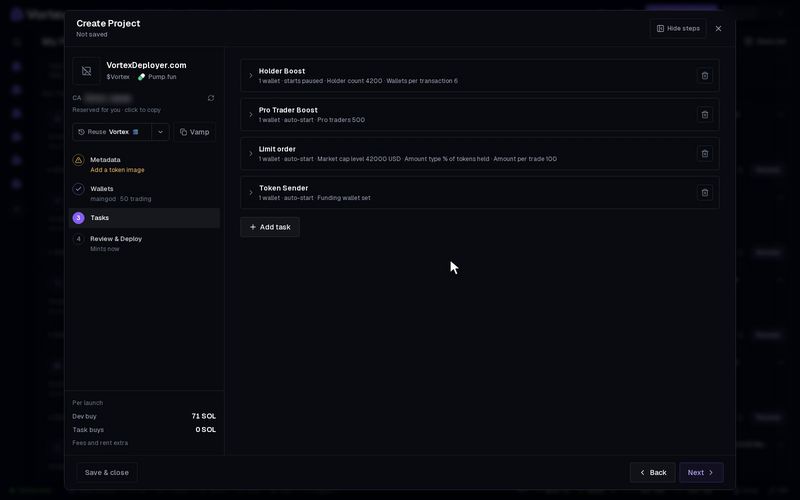
Step 3, Tasks, gives your launch its first buyers. A launch task is a normal task that is tied to this launch and can start the moment the token exists.
Tasks are optional. Without one, the launch only makes the token, plus the dev buy if you set one.
Before you start#
Add trading wallets on the Wallets step. Tasks pick their wallets from there. The creator wallet does not count.
Add a task#
- With no task yet, the list of tasks is already open. Click one to add it.
- To add another, click Add task.
- Fill in the card. It has the same settings as New task, with your project wallets on the side.
- Pick the wallets that should trade, and the amount for each.
The two launch buys come first in the list:
- Bundle — your wallets buy in the same moment as the launch. Solana only. See Bundle.
- Snipe — your wallets buy right after the token appears. See Snipe.
Most other tasks follow, such as Volume, Buy, Limit order and Holder Boost. Migrate & Buy, Wallet Warmup and Mixer are not offered here.
Amounts on the cards are in SOL (or ETH on Robinhood Chain), even when the token has another pair token.
Auto-start at launch#
Every card has an Auto-start at launch switch:
- On — the task starts the moment the token exists. A Bundle on Solana goes out together with the launch itself.
- Off — the task is made but paused. Start it later from the terminal.
When you press Create, every task with Auto-start at launch on buys with real SOL or ETH. Each buy also pays the platform fee. See Platform fees & tiers and Real funds & confirms.
Bundle details#
- A Bundle never uses the creator wallet. Add at least one other wallet on step 2.
- With many buyers, a Bundle may need a lookup table. A Lookup table box shows up only when one is needed.
- Allow automatic lookup-table setup lets the app make the table from the dev wallet before you press Create. The card shows the most it can spend and how many buyers fit. Unused money stays in the wallet. The rent comes back when the table is closed.
- A table made for a launch that never happens is closed after a day. Its rent goes back to the dev wallet.
Supply estimate#
On Snipe, Buy and Bundle cards, Supply estimate shows the share of the token each wallet would get. Click Calculate supply % to work it out.
It is a best case. It assumes nobody else buys in between. Your real share can only be lower.
Robinhood Chain limit#
On Robinhood Chain, at most 31 wallets can buy the instant the token launches, across all Snipe and instant Buy tasks. With more, Create stays greyed out. Remove some wallets, or give them a Buy task with a delay.
Troubleshooting#
- "No bundle wallets" — add a wallet other than the dev wallet on step 2.
- A card says it is not complete — open it and fill in the field shown in red.