Token details
Fill in step 1 of the wizard, the token's name, symbol, image, links and address.
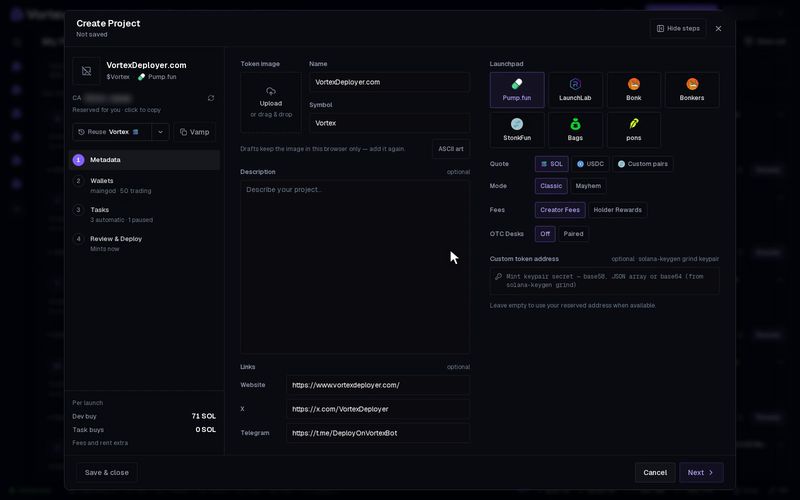
Step 1, Metadata, is what buyers see: your token's image, name, symbol and links. You need a name, a symbol and an image. Everything else is optional.
Start from a past launch or another token#
- Reuse — fills the whole wizard from your latest launch. The arrow next to it lists older ones. It copies the details, launchpad, wallets, dev buy and tasks. Your old project does not change.
- Vamp — copies another token's name, symbol, description, links and image. See Clone a token.
Until you have launched a token, the button reads Reuse · none yet.
Fill in the token#
- Token image — click Upload, or drag a file onto the square. PNG, JPG, GIF or WEBP, up to 5 MB. Large pictures are shrunk to 512 × 512. GIFs are kept as they are. Hover the image and click Change to swap it.
- No image? Click ASCII art. Type a short text, pick a Style and colours, then click Select. It becomes a 512 × 512 image.
- Name — up to 32 bytes. Most letters count as one byte. Emoji and accented letters count as more.
- Symbol — the short ticker, up to 10 bytes.
- Description — optional, up to 500 characters.
- Links — optional Website, X and Telegram.
- Launchpad — pick where the token launches and its pair token. See Launch settings and Pair tokens.
The name, symbol and image go on the chain at launch. The app cannot change them afterwards.
Your reserved address#
Every token has a contract address, often called the CA. On Pump.fun, LaunchLab, Bonk and Bonkers, the wizard reserves one for you while you fill in the form.
- It shows in the left column with "Reserved for you · click to copy". Click it to copy the address.
- Your token lands on that address. With more than one launch, only the first launch uses it.
- Click Refresh contract address (the circular arrow) to get a new one.
On StonkFun, Bags and pons, the launchpad gives the address at launch.
Custom token address#
You can launch on a vanity address you made yourself, for example one that ends in "pump". This works on Solana only.
- Make a keypair with a tool such as
solana-keygen grind. - Paste its secret into Custom token address. Base58, a JSON array or base64 all work.
- The field shows "Lands on" and the address it will use.
- A custom address fits one launch only, so Launches must be 1.
- If the address already exists on the chain, pick another keypair.
- Leave the field empty to use your reserved address.
The keypair secret controls that token address. Paste it only here, and never share it.
Troubleshooting#
- "Image must be ≤ 5 MB" — pick a smaller file.
- A red line says the name or symbol is too long — it counts bytes, not letters. Shorten it or remove emoji.
- "No contract address was reserved" — click Refresh contract address to try again.