Clone a token
Copy another token's look with Vamp, or copy every new launch of another creator with Copy deploy.
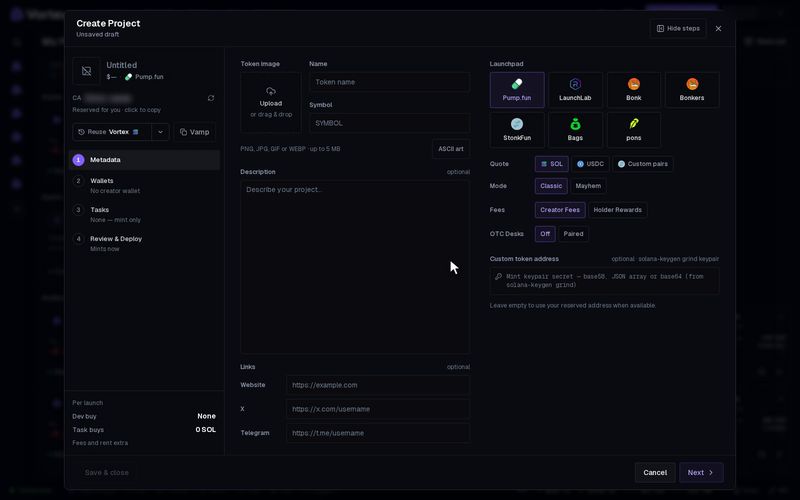
There are two ways to copy here. Vamp copies the look of one token into your launch form. Copy deploy watches another creator and launches a copy of each new token they make.
Vamp a token#
Vamp fills your launch form with another token's name, symbol, description, links and image.
You find Vamp in three places:
- The Create Project wizard, next to Reuse.
- The Quick deploy window, next to Reuse.
- The top of the XID page. There it opens the wizard with the token's look filled in.
- Click Vamp. The Vamp a token window opens.
- Paste the token's contract address into Contract address. A Solana address or a 0x address both work. The Paste from clipboard button next to the box does it for you.
- Click Load. You see the token's image, name and symbol, with its Description and its X, Telegram and Website links.
- Click Use this look. The form fills in. Change anything you like before you launch.
The image is copied as your own file. If it cannot be copied, a message asks you to pick an image yourself.
In Quick deploy, Vamp fills only the name, symbol and image. Click Full wizard to keep the description and links too.
Vamp options#
- Auto-detect clipboard — when the window opens, it takes a token address from your clipboard. On by default.
- Auto-load — loads the token as soon as a valid address is in the box. On by default.
Both are remembered in this browser.
Vamp copies the look only. The launchpad, pair token, wallets, dev buy, fees and tasks are yours to set. Nothing about the old token's price or holders comes along.
Copy deploy#
Copy deploy watches another creator's wallet and launches a copy of each new token they make, from your wallet, on its own. Unlike Vamp, it copies the whole launch, not only the look, and every copy spends real SOL or ETH. See Copy deploy.
Troubleshooting#
- "Not a Solana mint (base58) or a 0x contract address." — check that you pasted the whole token address.