Launch settings
Choose the launchpad, pair token, mode and fees, and set the dev buy, launch time and number of launches.
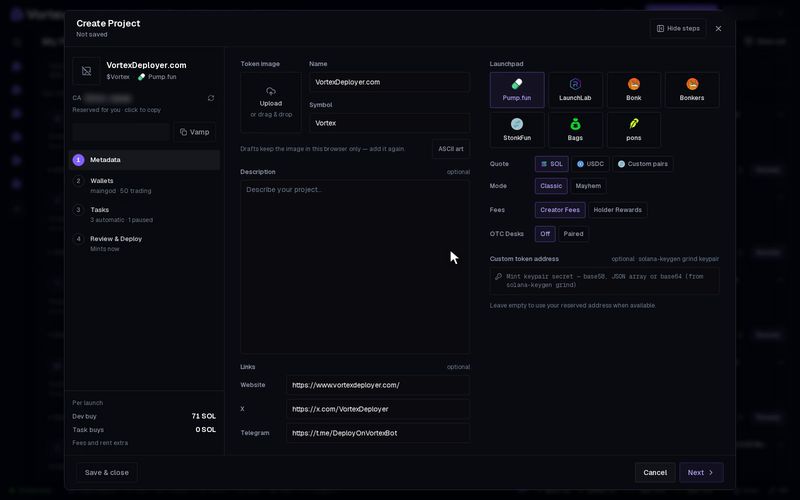
These settings decide how your token launches: where, in which coin, with which fee rules, when, and how many times. You set them on step 1 (Metadata) and step 4 (Review & Deploy) of the wizard. Quick deploy keeps the same settings in its presets.
Launchpad#
The launchpad is the site your token launches on. The tile you pick also sets the chain.
- Pump.fun — Solana. Pairs: SOL, USDC or Custom pairs.
- LaunchLab (Raydium), Bonk and Bonkers — Solana. Pairs: SOL or USD1.
- StonkFun — Solana. Paired with a tokenized stock.
- Bags — Solana. SOL only.
- pons — Robinhood Chain. Pairs: ETH, USDG, stocks or Custom CA.
The Quote row picks the pair token, the coin your token is priced in. See Pair tokens for what each one means.
Pump.fun options#
- Mode — Classic (default) or Mayhem, pump.fun's own launch mode. Mayhem needs a SOL or USDC pair.
- Fees — who gets the creator fees from trading:
- Creator Fees (default) — they go to you, the creator.
- Holder Rewards — they go to holders, paid by pump.fun in the pair token. Holders need more than $20 worth. Nobody has to claim.
- Custom-pair fee (%) — only with Custom pairs. The creator fee each trade pays. From 0.01% to 3%, default 1%. With SOL or USDC, pump.fun's standard fees apply instead.
- OTC Desks — only with a SOL pair and Creator Fees. See OTC Desks pairing.
Holder Rewards is permanent. The Custom-pair fee is final at launch and cannot be changed.
StonkFun options#
- Pick the stock your token is paired with. See StonkFun stocks.
- Pick a Mode:
- Standard — a plain token with no tax.
- Reward — a tax on every transfer of your token. StonkFun pays it out to holders.
- Community — the same tax. StonkFun pays part of it to the stock's holders and the rest to your token's holders. It shows only when the stock offers it.
- With Reward or Community, pick a Tax of 1% (default) or 3%. A line below sums up the terms, such as "Reward mode: a 1% tax is taken on every transfer and paid out to holders by StonkFun."
The review shows your choice next to the stock, such as "TSLAX · community (3% tax)".
A saved setup can name Community for a stock that does not offer it. Then an amber line under Mode names the stock. It says the stock "does not offer Community mode — pick Standard or Reward, or another stock." The same line shows in "Before you can launch, add:". Click Fix to go back to Mode. Create and Quick deploy's Deploy stay greyed out until you change it.
pons options#
- Creator fees — who gets the creator share of each trade: Creator wallet, Holders or Custom address (a 0x address on Robinhood Chain). Holders costs two extra transactions from the creator wallet at launch.
- Tax — the creator share of each trade. The box shows the highest allowed value as "max".
- Buyback — uses the platform's share of fees to buy your token back.
Dev buy#
The dev buy is set on the Wallets step. The limits are 85 SOL, 10 ETH, or 1,000,000 USDC or USD1. Max keeps 0.045 SOL per launch for fees and rent.
Launch at#
On Review & Deploy. Leave it empty to launch now. Or pick a time from 30 seconds to 30 days ahead.
- Pick a date and time in Launch at. The Create button now reads Schedule.
- Click Schedule. The wizard closes. You see "Launch scheduled for" with the time and a task number.
- The draft waits on Projects until then. Click Cancel schedule on its tile to stop it. The draft stays.
The whole launch, with the dev buy and tasks, runs as one scheduled launch. Click the × next to the time (Mint now instead) to clear it.
Launches#
Launches makes the same token setup up to 10 times in a row. The default is 1. Each launch uses the same wallets, dev buy and tasks.
- With more than 1, the line below checks your wallets, for example "Your wallets fund 3 of 5 launches" and the reason.
- The launch batch stops at the first launch your wallets cannot pay for. Earlier launches keep running.
- The terminal opens after the first launch. The rest launch in the background, and you can keep working. A notice counts them, for example "Minted 2 of 5 launches".
- Each new token shows on Projects as it lands.
- A custom token address only works with 1 launch.
Each launch in a batch pays its own dev buy, fees and task buys. With 5 launches, every buyer wallet buys 5 times. Check the cost line before you press Create.
Before you can launch#
Review & Deploy lists anything still missing under "Before you can launch, add:". Click Fix to jump to it. Create stays greyed out until the list is empty.
There is no test mode in the wizard. Create and Schedule spend real money and cannot be undone. See Real funds & confirms.