Wallets step
Pick the creator wallet, set the dev buy and add trading wallets in step 2 of the wizard.
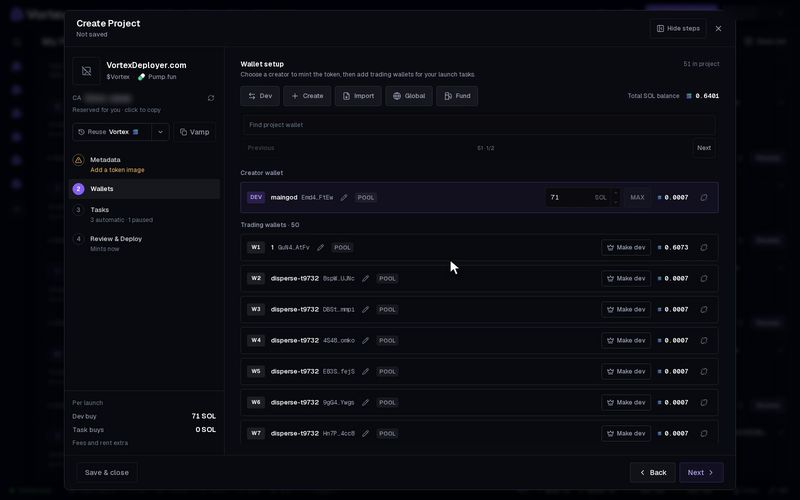
Step 2, Wallets, picks the wallets for this launch. The creator wallet makes the token and pays the launch fee. Trading wallets are the ones your launch tasks buy and sell with.
Every wallet you add here becomes a project wallet. It shows under this project on the Wallets page.
Pick the creator wallet#
- Click the Dev tile, or the Choose creator wallet card.
- Pick Create new to make a fresh wallet, or Import private key to use one you have.
- To use a wallet already in the list, click Make dev on its row. The old creator becomes a normal trading wallet.
Add trading wallets#
The tiles along the top add wallets:
- Create — makes new wallets. Type the Number of wallets. Add an optional Naming pattern, such as
Volume #{n}. The{n}becomes 1, 2, 3 and so on. - Import — paste Private keys, one per line. They are stored encrypted, for this project only.
- Global — add wallets from your wallet pool, one by one or a whole group with Assign a group. They stay in the pool, so other projects can use them too.
- Fund — send SOL or ETH to the project wallets. See Fund wallets. It is greyed out until the project has a wallet.
Next to the tiles you see the total balance of all project wallets. The list below has two parts: Creator wallet and Trading wallets. Use Find project wallet to search it.
Trading wallets are optional. You can launch with only a creator wallet.
Set the dev buy#
The dev buy is the amount the creator wallet buys in the same transaction that makes the token. It makes the creator the first holder. Leave it empty for no dev buy.
- Find the Dev buy box on the creator wallet's row.
- Type an amount, or click Max.
- Max — fills in what the creator can spend. It keeps 0.045 SOL per launch for fees and rent. It works for SOL only.
- Limits — up to 85 SOL, 10 ETH, or 1,000,000 USDC or USD1.
Where the money comes from depends on your pair token:
- SOL or ETH — the creator spends its own SOL or ETH.
- USDC or USD1 — the creator must already hold that coin. The launch does not swap for it. Use Convert on the Wallets page first.
- A stock or pump coin on Pump.fun, or a StonkFun stock — you type the amount in SOL. The launch swaps it into the pair token for you. The creator only needs SOL.
- USDG or a stock on pons — you type the amount in ETH. It is swapped into the pair token before the buy, with a 1% swap fee.
See Pair tokens for more.
The dev buy spends real SOL or ETH the moment the token launches. It cannot be undone. Fees and rent come on top of it. See Real funds & confirms.
Launch tasks trade from the trading wallets. The creator joins a task only when you switch it on in that task. A Bundle never uses the creator.
Remove a wallet#
Click the remove button on a row. The wallet leaves this project and stays in your global pool, with its key and balance. It is never deleted.