Fund wallets
Send SOL or ETH into many wallets in one run, from a deposit address or from one of your wallets.
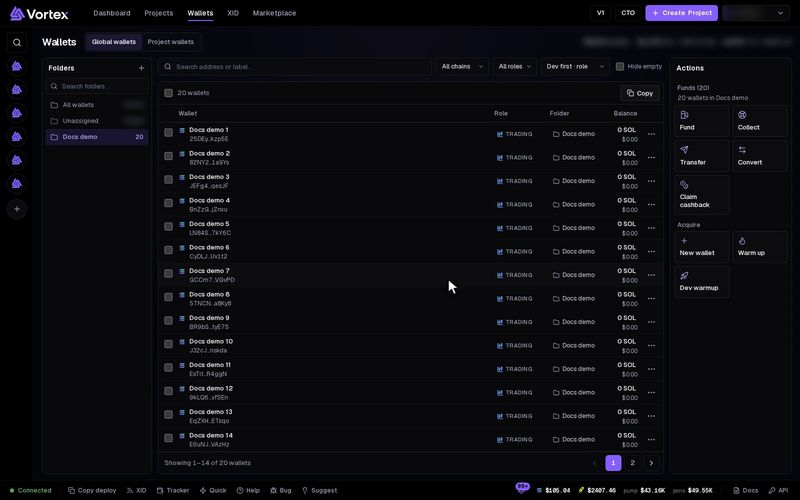
Fund fills many wallets at once. You send one amount, and the app splits it across the wallets you picked.
Funding sends real SOL or ETH, and a payment that has gone out cannot be called back. Check the wallets, the amount and the fees first. See Real funds & confirms.
Before you start#
- Open Wallets. Tick the wallets to fund, or tick none to fund every wallet in view. A folder or a project narrows the view.
- One run funds wallets on one chain. If the view has both chains, pick one under Chain.
Pick a method#
Press Fund in the Actions panel. Fund wallets opens. Pick the Method:
- Vortex Disperse — your money goes into a temporary deposit wallet. Short-lived in-between wallets then pay each of your wallets, so they are not paid straight from one shared wallet. See Vortex Disperse.
- Mixer — an outside exchange service, Husher, pays each wallet after a wait. Each wallet must get at least 0.15 SOL (or 0.01 ETH). See Mixer.
Step 1: Amount and wallets#
- Check Wallets to fund. They all start ticked. Untick any to skip.
- Enter the Total SOL to deposit. The default is 1.
- Pick a Distribution:
- equal — every wallet gets the same share.
- custom — type an amount beside each wallet. The total is their sum.
- variation — each share is a little bigger or smaller, at random. Variation ± % sets how much (1 to 100, default 20). The shares still add up to the total.
- Optional: pick a Supply plan and press Mount. Each wallet that is short of its planned buy gets exactly what it is missing. Manage plans opens your plans.
- Pick where the money comes from under Fund from:
- Deposit address · pay from anywhere — you send the money from any wallet or exchange. This is the default.
- One of your wallets — it must hold the whole total. A wallet with too little is marked short.
- Optional, under Advanced: Per-wallet delays makes each wallet wait 0 to 1440 minutes before it is paid. Auto-distribute spreads the delays over the minutes in Spread over.
The summary shows how much each wallet gets. For Vortex Disperse on Solana it also shows Fees and reserve: the exact SOL taken off before the split.
Then press Get deposit address, or Start disperse when one of your wallets pays. For Mixer, press Next — exchanges & holds.
Step 2: Exchanges and holds (Mixer only)#
Each wallet gets its own exchange and hold time. A hold is how many minutes the exchange keeps that share before it pays out. 0 pays as soon as your deposit is confirmed.
- Randomize exchanges mixes the exchanges across your wallets.
- Auto-distribute holds spreads the holds over the minutes beside it.
Then press Create order — get deposit address, or Create order when one of your wallets pays.
Step 3: Pay and follow#
If you chose a deposit address:
- Send exactly the amount under Send exactly to the address shown. You can copy it or scan the QR code.
- Follow the timeline: Awaiting deposit, Funded, Distributing, Complete. With Mixer it is Awaiting deposit, Funds confirmed, Complete.
- With Mixer, Execute now on a row pays that wallet right away and skips its hold.
With Vortex Disperse, the deposit may be up to 0.005 SOL short (0.1 % on Robinhood).
If one of your wallets pays, there is nothing to send. Either way, the run is a task: closing the window does not stop it.
The run waits 30 minutes for your deposit. After that it stops, and nothing has moved. The address still belongs to that run. Send the money to it, then start the task again.
Fees#
- There is no platform fee on funding.
- Vortex Disperse — network fees, the rent for the in-between wallets, and a small reserve come off your total before the split. The reserve, about 0.001 SOL, stays in the deposit wallet. On Robinhood, the gas for each wallet's hop comes off instead.
- Mixer — Husher takes its own fee out of the total. Each wallet gets its share after that fee.
With Vortex Disperse, the deposit wallet shows in your wallet list with the role disperser while the run is going. If a run fails, it stays there. You can then collect its funds or export its key.