Wallets overview
Find your way around the Wallets page, and learn what each button in the Actions panel does.
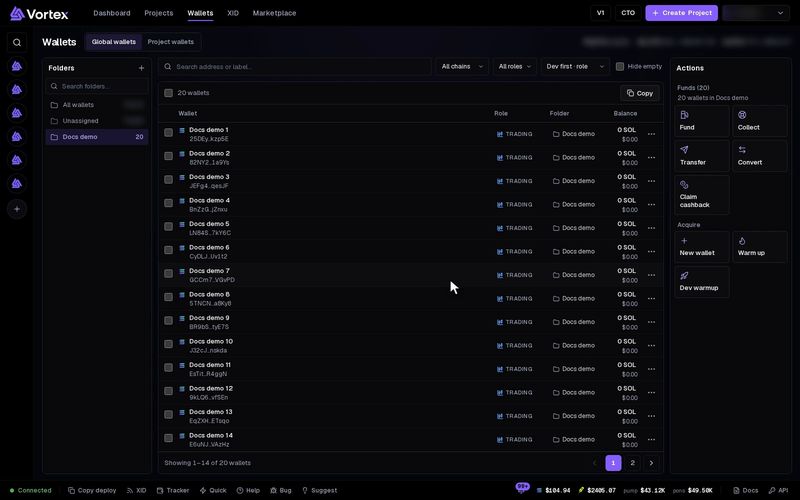
The Wallets page holds every wallet the app manages for you. Here you make wallets, sort them, move money in and out, and save their keys.
Each wallet holds real SOL or ETH on a live chain. Every action on this page moves real funds, and there is no test mode. Read each confirm before you press it. See Real funds & confirms.
Global wallets and project wallets#
The switch at the top picks what you see:
- Global wallets — your wallet pool: every wallet you made, imported or bought. You can sort them into folders.
- Project wallets — the wallets of one project. Pick it in the left column, or find it with Search projects.
In Project wallets, the Origin column says where each wallet came from:
project— made inside this project. Other projects can use it too.assigned— a pool wallet you linked to this project. It stays in your pool.
Assign from pool links pool wallets to the open project. Remove from project takes them out of the project. Nothing is deleted: an assigned wallet stays in your pool, and a project wallet moves to your pool. Deleting a project moves its wallets to your pool too.
The layout#
On a wide screen the page has three columns: Folders (or Projects) on the left, the wallet table in the middle, and the Actions panel on the right.
Above the table you can search by address or label, filter by chain (All chains) and role (All roles), and sort. Hide empty hides wallets with no balance.
On a phone the page is one column. The folder picker and Folders come first, then the Actions panel folded shut, then search and Filters. Each wallet is a card with its label, address, role and balance.
The wallet table#
| Column | What it shows |
|---|---|
| Wallet | The label and address. Click the label to rename it. |
| Role | What the wallet is for. See Roles below. |
| Folder | Its folder. Pick another one to move it. |
| Balance | The live balance. It shows connecting… until the first check. |
| ⋯ | Activity, Copy address, Export key, Delete wallet |
Activity shows the wallet's age, its trades, the tokens it traded, the SOL it spent and received, and its realized PnL.
Roles#
A wallet role is a short tag that says what a wallet is for: Bundle, Sniper, Dev, Trading, Fee or Holder. New wallets start as Trading.
- Click the role in the table (Change role) to pick another. Custom role… adds your own: lowercase letters, digits and
_, up to 32 characters. - Dev marks a dev wallet, the wallet that creates a token. Dev wallets are listed first.
- A Trading wallet that joins a bundle task becomes Bundle. One that joins a snipe task becomes Sniper. A role you set yourself never changes.
Select wallets#
Tick the box at the start of a row. The bar above the table then offers Move to folder, Unassign, Export keys, Delete and, in a project, Remove from project. Copy copies the ticked addresses, or every address in view. On a narrower screen these buttons sit in the Actions panel under Selection.
The Actions panel#
Each action works on the wallets you ticked. With nothing ticked, it works on every wallet in view. Funds (N) shows how many that is.
| Button | What it does |
|---|---|
| Fund | Sends SOL or ETH into many wallets. See Fund wallets. |
| Collect | Pulls SOL or ETH from many wallets to one address. See Collect funds. |
| Transfer | Sends from one wallet to any address. See below. |
| Convert | Swaps one token for another in each wallet. See below. |
| Claim cashback | See Claim cashback. |
| New wallet | See Create & import. |
| Warm up, Dev warmup | Give wallets a history. See Wallet warm-up. |
Convert and Claim cashback work on Solana wallets only. Fund, Collect, Transfer and the warm-ups each start a task. Closing the window does not stop it.
Transfer#
- Press Transfer. Send SOL to address opens (ETH on Robinhood).
- Pick the Source wallet (pays + sends) and paste the Destination address.
- Enter the Amount to send. Press Send SOL now, then confirm.
The source wallet also pays a small network fee and keeps a little rent. To empty a wallet fully, use Collect.
Funds sent to a wrong address are gone. Check the address before you confirm.
Convert#
Convert swaps a token inside each wallet, for example SOL to USDC. You review the trades first, and no tokens move until you press Convert N wallets. See Convert tokens.
Delete a wallet#
Delete wallet in the row menu, or Delete on a selection, asks first.
- A wallet used by a running or paused task cannot be deleted.
- A pool wallet that is still in a project asks again. If you go ahead, it leaves those projects too.
- Deleting removes the wallet from your lists. It does not move its funds.
Collect the wallet's funds or export its key before you delete it. If you import the same key later, the wallet comes back.