Solana
Claim cashback
Claim the cashback your Solana wallets earned from trades on cashback coins. It arrives as wrapped SOL.
Some pump.fun coins are cashback coins. When one of your wallets trades such a coin on PumpSwap, part of the trading fee is set aside for that wallet as cashback. It is not sent to the wallet by itself. Claim cashback moves it into your wallets.
New coins can no longer turn cashback on. This page is for coins that already have it.
Claim#
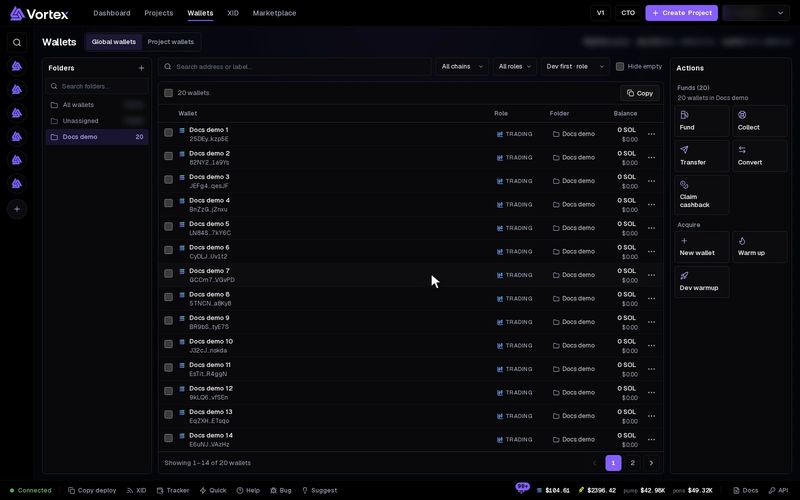
- Open Wallets. Tick the wallets to check, or tick none to check every Solana wallet in view.
- Press Claim cashback in the Actions panel.
- Wallets with cashback lists each wallet that has cashback waiting. They all start ticked. Untick any you want to skip, or use Select all and Clear all.
- Check the summary: Claim (the total SOL), Wallets, and New wSOL accounts.
- Press Claim now. A confirm shows the total and the number of wallets. Confirm to claim. The claim is real. See Real funds & confirms.
If no wallet in view has cashback, the window says: "None of the wallets in view has cashback to claim."
What a claim does#
- The cashback lands in each wallet as wrapped SOL (wSOL). It is not turned back into plain SOL, and nothing is closed. To get plain SOL, use Convert: pay with WSOL, receive SOL.
- Each wallet pays its own network fee for its claim.
- A wallet with no wSOL account gets one. That costs about 0.002 SOL of rent, which stays in the wallet as part of that account.
- There is no platform fee on a claim.
Troubleshooting#
- Nothing to claim — cashback comes only from PumpSwap trades on cashback coins. Trades on other coins do not earn it.