Wallet Marketplace
Buy ready-made wallets that already have funds, age or trading history, and see where they land.
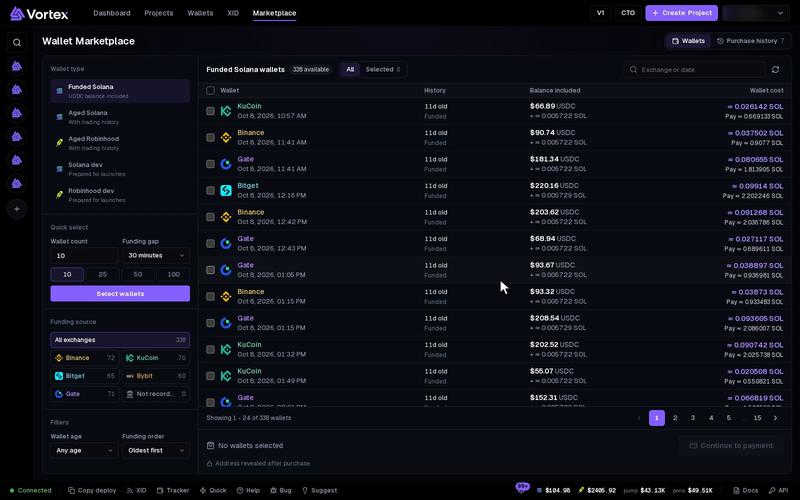
The Wallet Marketplace sells ready wallets. Some hold funds, some are weeks old with real trades, and some are dev wallets that have already launched tokens. Buy them when you need wallets that look lived-in today.
A purchase is paid on-chain and cannot be undone. Read the totals before you press Continue to payment. See Real funds & confirms.
Pick a wallet type#
Open Wallet Marketplace. Under Wallet type, pick one:
- Funded Solana — holds a USDC balance, which you keep.
- Aged Solana or Aged Robinhood — has a trading history. See aged wallet. Pick All traders, Pro traders or Regular.
- Solana dev or Robinhood dev — a dev wallet prepared for launches.
Filter the list#
- Funding source — the exchange that first sent funds to the wallet, such as Binance. Not recorded means it is unknown. See funding source.
- Wallet age — Any age, or 2, 4, 7, 14 or 30+ days.
- Funding order — Oldest first or Newest first.
- Trader profile — aged wallets only: US, Europe or Asia.
Reset filters clears them all. Each row shows the funding date, the wallet's age, its trades or launches, the balance inside and the price. The address stays hidden until you buy.
Choose wallets#
Tick wallets one by one, or let Quick select pick them:
- Set Wallet count. The default is 10.
- Set Funding gap, from 30 minutes to 6 hours.
- Press Select wallets. It says how many it found, for example "Selected 18 of 25 wallets."
The funding gap keeps your wallets from looking related: any two wallets you pick were funded at least that far apart. A wallet that breaks the gap cannot be ticked.
Some wallets for sale were first funded from the same wallet. You can buy them together in one order, if they meet the gap. Once you have bought one of them, the others are greyed out in later orders. They show the note "Shares a funding source with one of your previous purchases".
Check the price#
The bar under the list sums up your picks:
- Wallet cost — the price minus the balance already inside.
- Balance you keep — the SOL, ETH or USDC already in the wallets. It becomes yours.
- Total to pay — everything you send. Nothing is added on top.
When USDC is included, the figures say "(estimated)", because USDC is counted at today's rate.
Pay#
- Press Continue to payment. Your wallets are held for you for 30 minutes, and Checkout opens with a countdown.
- Send the Exact amount to send to the Payment address, on the chain shown. Use the copy buttons or the QR code.
- Wait. Checkout looks for your payment by itself. Check payment looks right away.
- When the payment arrives, you see Wallets delivered and the addresses. Press Open Wallets.
You can close checkout while you wait. Resume payment brings it back. You can have one unpaid order at a time.
Pay the exact amount, in one go, before the countdown ends. An exchange's withdrawal fee can make your payment arrive short. If time runs out, the wallets go back on sale. Do not send to that payment address any more.
Where your wallets land#
Bought wallets join your wallet pool under Global wallets. Each order gets its own new folder: Marketplace # plus the first 8 characters of the Order ID, for example Marketplace #1a2b3c4d. If you already have a folder with that name, the full order ID is used.
Dev wallets arrive with the Dev role, all others as Trading. A new wallet's balance may show connecting… until it is checked.
Purchase history#
Purchase history lists every order with its Date, Type, Amount, Status and Order ID. Click an order to open it.
- Awaiting payment — the order waits for your payment.
- Delivered — the wallets are yours.
- Expired — time ran out. If you paid late, press Check late payment.
- Needs review — a payment arrived but could not complete the order, for example too late or too little. Press Open Support and give the order ID.
Troubleshooting#
- "The quote changed." — prices moved since you picked. Refresh the page and pick again.
- "One or more wallets are no longer available." — someone bought them first. Refresh and pick again.
- "Finish your pending marketplace order first" — pay or wait out your open order.
- "One or more wallets share a funding source with one of your previous purchases" — pick other wallets.