Support
Ask for help, report a bug or suggest a feature, and follow the replies.
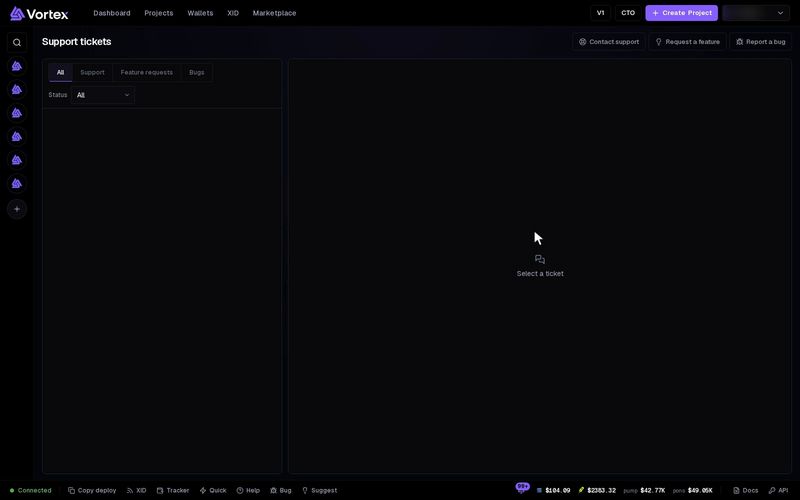
You talk to support through tickets. A ticket is a short written conversation with our team. You can ask a question, report a bug or suggest a new feature.
Open a ticket#
- Open the window you need:
- Click your name at the top right, then Support. On the Support tickets page, click Contact support, Request a feature or Report a bug.
- Or use the buttons in the bottom bar of any page: Bug (the bug icon) or Suggest (the light bulb). Help there opens the Support tickets page. On narrow screens only the icons show. On a phone, open the menu (the three lines at the top) and pick Report a bug or Suggest a feature.
- Check the Kind at the top: Support, Feature request or Report a bug. You can switch it here.
- Type a short Subject: at least 3 characters, at most 160.
- Fill in Details: at least 5 characters. Add the token address, wallet or task number if it matters.
- Click Submit.
You see "Thanks — your … was submitted." and your ticket number, such as Ticket #123. Click Done to close the window.
Do not paste a wallet's private key or your password into a ticket. Anyone who has a private key can take that wallet's funds.
Report a bug well#
A bug report starts with three headings already filled in: What I did, What I expected and What happened.
- Under What I did, list your steps, one per line.
- Under What I expected, say what should have happened.
- Under What happened, say what really happened. Paste any error text you saw.
The report is refused if you leave the headings empty. Open the report from the page where the problem happened. The app then adds some details for you:
- the page and its address
- your screen size, browser, language and time zone
- the chain you picked
- recent errors from the page
Other kinds of tickets only add the page and your browser.
Suggest a feature#
Click Request a feature or Suggest. Put the idea in one line in Subject. In Details, say what you want to do, why, and how it could work.
Follow your tickets#
The Support tickets page lists your tickets, the most recently active first, up to 100.
- Filter by kind with All, Support, Feature requests or Bugs.
- Filter by Status: Open, In progress, Resolved or Closed. Only support changes the status.
- A New reply label means support wrote back and you have not read it yet.
To reply:
- Click a ticket to open its conversation.
- Type in Add a reply….
- Click Send, or press Ctrl+Enter (Cmd+Enter on a Mac).
Support replies do not show up in the bell. Come back to Support tickets and look for New reply.
Troubleshooting#
"Add a short subject (3+ chars)" — Type a longer Subject.
"Fill in what you did and what happened" — Write under the bug report headings before you submit.
The ticket does not submit — Your text stays in the window. Read the red message, then click Submit again.