Dashboard
See your balance, your trading results and your tokens on one screen.
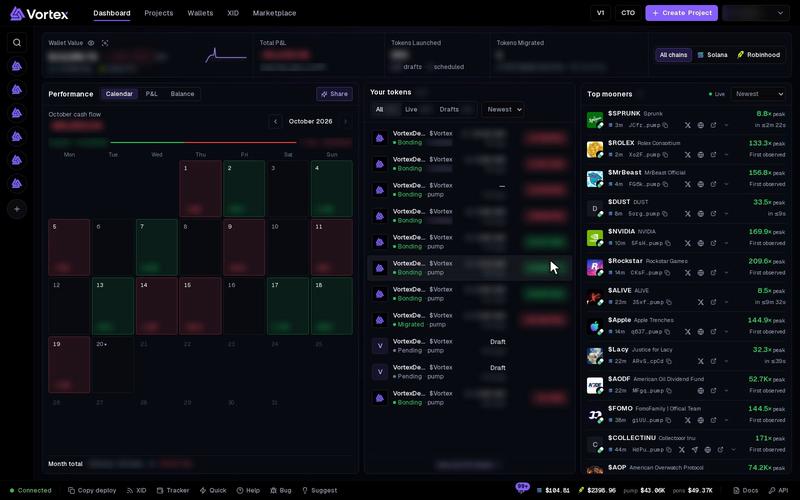
The Dashboard is your home screen. It shows what your wallets hold, how your trading is going and which tokens you launched.
Open the dashboard#
- Click Dashboard in the top bar.
- Pick a chain at the right end of the top row: All chains, Solana or Robinhood. Every figure on the page follows this choice.
The top row#
- Wallet Value — what all your wallets hold right now. With one chain picked, it shows SOL or ETH. With All chains, it shows US dollars. It reads Estimated Wallet Value when some tokens have no price yet or the figure is still updating.
- The small green or red figure beside it is the change over the last 24 hours. Deposits and withdrawals count too, so this change is not profit.
- Total P&L — your all-time P&L from trading. Under it, Cash flow is what your sells brought in minus what your buys cost. Holdings is what the tokens you still hold would bring if you sold them now. It reads Estimated P&L when part of it is an estimate.
- Tokens Launched — real tokens you launched. Drafts, simulated launches and projects you imported or took over with CTO do not count.
- Tokens Migrated — launches that filled their bonding curve and moved to a full trading pool. This move is called a migration. The line under it shows how many launches could migrate and how many are still on the curve.
Two small buttons sit next to the wallet label:
- Hide balances (the eye) — swaps every amount for dots. Click Show balances to bring them back. This helps when you share your screen.
- Scan portfolio — opens a read-only summary for each chain. It shows the coin in your wallets, the value of the tokens you hold, and lists of wallets and open positions. Full portfolio opens the Portfolio page. Fund / recover opens Wallets.
Performance#
This panel shows your results over time. Pick a view at the top:
- Calendar (the default) — one box per day. Each box shows sells minus buys for that day, in UTC time. Click a day to see its figure. Otherwise the panel shows the Month total.
- P&L — a line of your running trade cash. Pick Last 7 days, Last 30 days (the default) or Last 90 days.
- Balance — your wallet balance over time.
Calendar and P&L only count cash from buys and sells that went through. Tokens you still hold get no value here. That is why these views can differ from Total P&L, which adds Holdings.
A note such as "2 days pending" means some trade amounts are still being settled. The line updates by itself.
Share a P&L card#
- Click Share in the Performance panel.
- Pick a Card period: 1D, 7D (the default) or 30D.
- Under Card background, keep Default or pick Custom image to upload your own picture.
- Tick Show @username to print your username on the card. It is greyed out if you have no username.
- Click Copy or Download PNG.
Share is greyed out while balances are hidden, and before you have any trades.
Your tokens#
This list shows the tokens from your projects.
- Filter with All, Live or Drafts. Sort by Newest or P&L.
- Click a live token to open it in the trading terminal. Click a draft to finish it.
- The list shows up to 50 tokens. Click View all N tokens or Open projects to see every project.
If you have no projects yet, a Get started checklist takes this spot. Pick a goal (Launch, Trade or Wallets) and follow the steps: create a wallet, fund it, then launch, trade or organize.
Top mooners#
This list shows other people's tokens from the last 24 hours that rose to at least 8 times their starting price. Each did so within 10 minutes of launch. Each one also has at least $500 of liquidity.
- Sort by Newest or Highest peak.
- Click a name to open the token in the terminal. The arrow button opens it on a block explorer.
- Your own tokens never appear here.
These tokens already moved a lot. Buying one spends real SOL or ETH, and its price can fall fast.
Troubleshooting#
"Some dashboard data could not be refreshed" — Click Retry now on the notice. Until then, the page shows the last figures that loaded.
A day in the calendar is empty — No trades went through that day, or they are still settling.