Portfolio
See what your trading made or lost, what your tokens are worth now, and export the numbers.
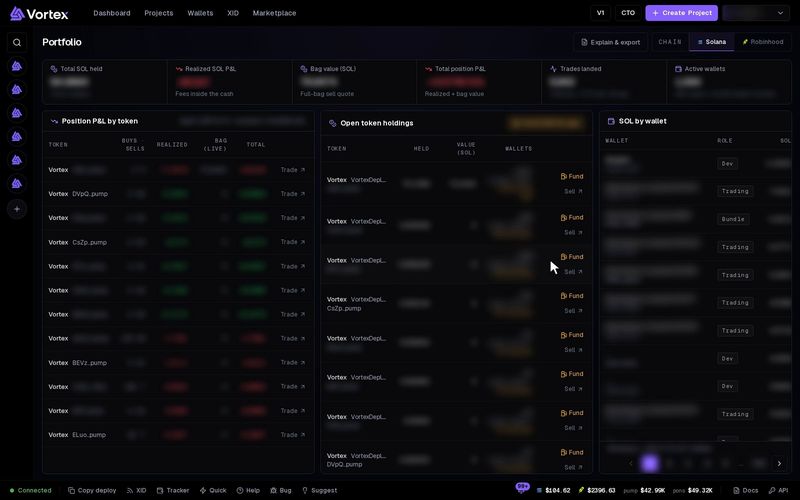
Portfolio shows your trading results on one chain. It shows what you spent, what you got back, and what the tokens you still hold are worth.
Open Portfolio#
- Click your name at the top right to open the user menu.
- Click Portfolio.
- Pick Solana or Robinhood at the top right. Portfolio shows one chain at a time. On Robinhood, every SOL label reads ETH.
You can also click Full portfolio in the Scan portfolio window on the Dashboard.
What P&L means#
P&L means profit and loss. Green means you are ahead. Red means you are behind. Portfolio splits it into two parts:
- Realized — everything your sells brought in, minus everything your buys cost. This part only changes when you trade.
- Bag value — what the tokens you still hold would bring if you sold all of them now. This is your bag. It moves with the price, so it changes all the time. Some apps call this part "unrealized".
Total position P&L adds the two together.
Example: you buy a token for 1 SOL. Later you sell half of it for 0.8 SOL. Realized is 0.8 − 1 = −0.2 SOL. The half you kept would sell for 0.7 SOL now, so bag value is 0.7 SOL. Total position P&L is −0.2 + 0.7 = +0.5 SOL.
Realized can be negative while you are still ahead. It only turns into profit once you sell the rest.
The figures at the top#
- Total SOL held — the SOL in all your wallets on this chain.
- Realized SOL P&L — sells minus buys, as above. The line under it shows the fees already inside this figure. Click the figure to see how it adds up.
- Bag value (SOL) — your remaining tokens, priced as one full sale right now. The price includes the price impact of that sale and the platform fee. The line under it reads Full-bag sell quote, or Saved valuation when it shows the last saved figure.
- Total position P&L — realized plus bag value.
- Trades landed — how many buys and sells went through, and when the last one was.
- Active wallets — how many wallets traded, across how many tokens.
The panels#
- Position P&L by token — one row per token, with Buys · Sells, Realized, Bag (live) and Total. Trade opens the token in the terminal.
- Open token holdings — tokens you hold now, how many, their value and which wallets hold them. Sell opens the trade panel with those wallets already picked.
- SOL by wallet — the SOL balance of each wallet.
A wallet needs a little SOL or ETH to pay the network fee for a sell. This is called gas. Under 0.005 SOL (0.0005 ETH on Robinhood), a holding shows "N need gas". Fund sends gas to those wallets. Fund N for gas at the top of the panel does it for every holding at once.
Fund and Fund N for gas open the fund window. Sending gas moves real SOL or ETH from your wallet to those wallets.
Explain and export your P&L#
- Click Explain & export at the top right.
- The Explain portfolio P&L window lists Spent on buys, Received from sells, Trade cash: received minus spent, Remaining holdings: estimated exit value, Total position P&L and Fees already included.
- Click Export this summary to save these figures as a CSV file.
- Under Recorded trade receipts, check each trade. Click Load older receipts to see more.
- Click Export loaded receipts (N) to save the trades you loaded as a CSV file.
Deposits and withdrawals are not trading profit, so they never count. Fees are already inside the figures. Do not subtract them again.
Why two screens can show different numbers#
You can see a token's P&L in two places: the PnL figure in the trading terminal, and Portfolio or the Dashboard.
- The terminal counts your trade as soon as it shows up on the chain. Portfolio counts it once it is saved to your trade history. Right after a trade, the two can differ for a short time.
- Bag value follows the price, so it changes from minute to minute.
- On the Dashboard, Calendar and P&L count only cash from buys and sells. Total P&L also adds the tokens you hold.
If the terminal and Portfolio still differ after a few minutes, a trade may not have been saved correctly. Open a support ticket and include the token address.
Troubleshooting#
"Some wallet balances are still updating. Totals are incomplete." — Wait a moment. The figures fill in by themselves.
"Total P&L unavailable: some holdings are unvalued." — Click Refresh holdings.
A token shows a dash under Bag (live) — No pool trades that token for SOL, so it cannot be valued. Its realized part still counts.