Sell all
Sell every token your wallets hold on this token with one press, with or without the dev wallet.
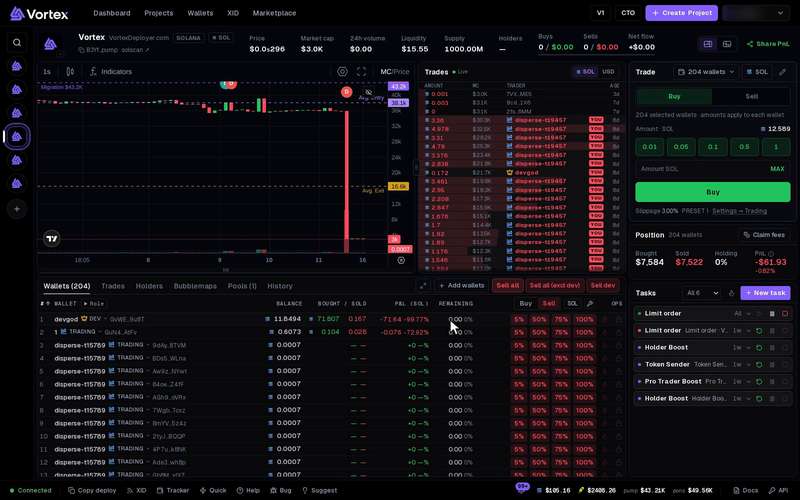
Three buttons sell whole bags at once. They sit in the Wallets tab of the terminal, right of Add wallets.
- Sell all — sells 100% from every attached wallet.
- Sell all (excl dev) — the same, but leaves the dev wallet alone.
- Sell dev — sells 100% from the dev wallet only.
Here "dev" means the wallet that created this token. It is not every wallet with the dev role.
One press sells for real at market price. It cannot be undone. Each sell pays the platform fee on what it gets back, plus a network fee. By default there is no question first. See Real funds & confirms.
What happens when you press#
- The app sends one 100% sell for every wallet in scope. It sends them all at once, not one after another.
- The server checks each wallet's real balance at that moment. It sells what the wallet really holds, not what the screen showed.
- A wallet with nothing to sell is skipped. Skips are not failures.
- When the sells finish, one message sums them up. For example: "Sold on 21/21 wallets · 65 skipped: nothing to sell".
- Your position, the wallet rows and the Trades panel update as the sells land.
The sells use the slippage of your active preset. A wallet that fails, for example because the price moved too far, is listed in the message. It does not stop the other wallets.
With many wallets#
The buttons send every attached wallet, even ones the screen shows as empty. With 80 wallets attached and 20 holding, you see 20 sold and 60 skipped.
All the sells hit the same market at the same moment. On a small market, each sell pushes the price down for the next one. The last sells can get much less than the first.
To sell over time instead, use a Ladder or a DCA task. To sell part of each bag, use % of bag in the Trade panel.
The buttons never lock. A small number on a button counts its sells still running. Pressing again sends another round.
Ask before selling#
To get a question before these buttons sell, open Settings → Trading → Confirmations and turn on Confirm Sell all. It covers all three buttons.
Sell through another wallet#
Under Settings → Trading, Sell through another wallet can run each sale from a temporary wallet. Choose All sells, or choose Custom and turn on Sell all, Sell all except dev and Sell dev one by one.
On Solana this takes two transactions. The first sends 0.01 SOL and the tokens to the temporary wallet. The second sells and sends all the SOL back. Each one pays a network fee. If the temporary wallet can't be set up, the app sells straight from your wallet instead.
Troubleshooting#
- "No wallets attached" — this token has no wallets yet. Use Add wallets first.
- "No non-dev wallets attached" — only the dev wallet is attached, so Sell all (excl dev) has nothing to send.
- "Creator wallet is not available yet" — the app can't find this token's dev wallet among your wallets. Sell dev works only on your own launches, with the dev wallet attached.