Burn & lock
Destroy a wallet's tokens for good, or lock them until a date you pick, from the terminal.
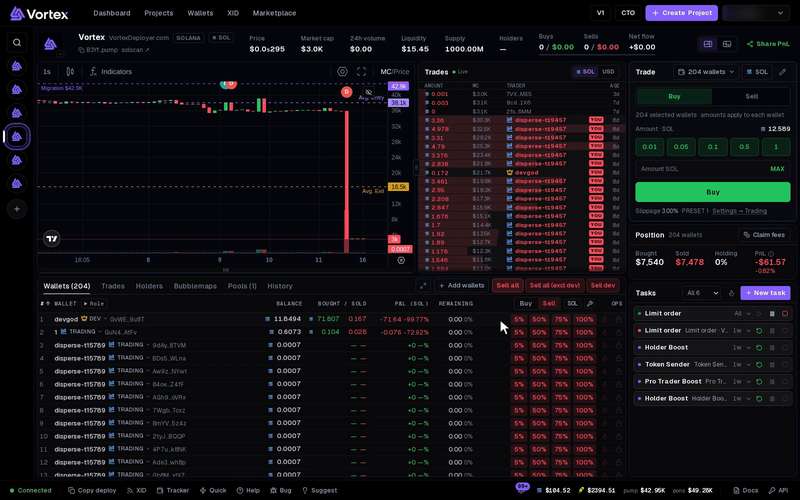
Each wallet row in the terminal has buttons for the tokens it holds. Burn destroys them. Lock puts them in a Streamflow lock until a date you pick. Teams use them to show that these tokens will not be sold.
A burn destroys the tokens forever. Nobody can bring them back, not you and not us. A lock cannot be opened early either, not even by you. See Real funds & confirms.
Before you start#
- Open the token in the terminal. See The terminal.
- The wallet must hold some of the token. If it holds none, the buttons are greyed out.
- A burn needs a little SOL or ETH for the network fee.
- A lock needs at least 0.01 SOL in the wallet.
Find the buttons#
- Open the Wallets tab.
- Find the wallet's row. At its right end, under Ops, sit two small buttons.
- The flame button is Burn. The lock button is Lock. Hover over one to see its name. The lock button shows on Solana only.
Burn tokens#
- Press the flame button on the wallet's row. The Burn window opens with the token's symbol, such as Burn ABC.
- Choose how much:
- Percentage of the holding — 25%, 50%, 75% or 100% of what this wallet holds. 100% is picked at first.
- Or an exact amount (ABC) — type a number of tokens. It can be at most what the wallet holds.
- Check Will burn and From on the right.
- Click Burn now. A question asks "Really burn … ? Burning is permanent." Confirm it.
- When it is done, you see "Burned" with the amount and a short part of the transaction id.
Click Cancel to close the window without burning.
On Solana, the tokens are destroyed and the token's supply goes down. The wallet's empty token account stays open. Close out can close it and give you its rent back.
On Robinhood Chain, the tokens are sent to the dead address. No one controls it, so the tokens can never move again. The total supply number on the chain stays the same.
Lock tokens#
Locks work on Solana only.
- Press the lock button on the wallet's row. The Lock window opens, such as Lock ABC. It says "Streamflow hard lock · Solana only".
- Choose how much: Percentage of the holding or Or an exact amount (ABC), as for a burn.
- Set Lock duration (days). The default is 180 days. You can pick from 1 hour (0.042 days) to 3650 days, about 10 years. The date it unlocks shows under the box.
- Optional: type a Lock name (optional), such as "Team tokens". Up to 64 characters. If you leave it empty, the lock is named "Token Lock".
- Check Will lock, Until and From on the right.
- Click Lock now. A question asks "Really lock … until …? The lock cannot be cancelled or moved early." Confirm it.
- When it is done, you see "Locked" with the amount, the unlock date and a short part of the transaction id.
How the lock works#
- The tokens leave your wallet and sit in a lock on Streamflow until the date.
- Nobody can cancel the lock, add to it or move it to another wallet. Not even you.
- On the unlock date, the whole amount is free to take back. It goes back to the same wallet.
- The app has no button to take tokens out of a lock. After the date, you take them out on Streamflow's own site, with the same wallet. To use the wallet there, you need its private key. See Export a private key.
- The app does not list your locks. Write down the unlock date, or look the wallet up on an explorer.
What it costs#
- Burn — only the network fee. On Robinhood Chain that is a little ETH for gas. There is no platform fee.
- Lock — Streamflow takes a fee of about 1%, in the token, on top of the amount you lock. That is why 100% locks a little less than the whole balance. If an exact amount leaves no room for the fee, the app locks a little less too. The wallet also needs at least 0.01 SOL for the lock's network fee and Streamflow's costs. There is no platform fee.
Which tokens#
Burn works for any token a wallet holds, on Solana and Robinhood Chain, whatever its launchpad. Lock works for any Solana token. Robinhood Chain tokens cannot be locked here.
Troubleshooting#
- The buttons are greyed out — the wallet holds none of this token. Hover over a button: it says "Nothing to burn" or "Nothing to lock".
- "wallet needs at least 0.01 SOL for the lock" — add SOL to the wallet and try again. See Fund wallets.
- "Enter at most … , the wallet's holding." — your amount is more than the wallet holds. Type less, or pick a percentage.
- "Enter between 0.042 (1 hour) and 3650 days." — the lock time is too short or too long. Pick a time in that range.