Real funds & confirms
What spends real money in VortexDeployer, which actions ask you first, and how to check a plan before you spend.
Everything in VortexDeployer happens on a real blockchain with real SOL or ETH. This page lists what spends money, what asks you first, and how to check a plan before you spend.
The app has no Dry run or Simulate switch. Every launch, trade, task and transfer is real. A confirmed transaction cannot be undone, and nobody can reverse it for you.
What spends real money#
- Launching — the dev buy, the buys from your launch wallets, and about 0.03 SOL of network fees and rent on top.
- Buying and selling — the amount you trade, network fees and the platform fee.
- Tasks — every buy and sell a task makes, for as long as it runs.
- Moving funds — Fund, Collect, Transfer, Convert and the mixer.
- Wallet warm-up — real trades on live pump.fun coins.
- Copy deploy — each copy is a real launch. See Copy deploy.
- Marketplace — buying wallets.
Actions that ask first#
These actions show a confirm box or a review step. Read it before you go on.
| Action | What you see first |
|---|---|
| Transfer from one wallet | "Really send … ? This is irreversible." |
| Collect | The Confirm collection window: "This moves real funds and cannot be undone." Press Collect now to go on. |
| Convert | Review conversion shows the plan. Then the button reads, for example, Convert 3 wallets. |
| Warm up | "Warm up … wallets with real trades? Each buy spends …" |
| Dev warmup | "Launch … real tokens from …?" |
| Claim cashback | "Claim … SOL of cashback on … wallets?" |
| Deleting wallets | "Delete … wallets? Export any key you still need first." |
| Burning tokens | "… Burning is permanent." |
| Locking tokens | "… The lock cannot be cancelled or moved early." |
| Copy deploy | "Each copy is a real launch that spends the dev buy, rent and network fees …" |
Actions that do not ask#
- Create on Review & Deploy launches at once. The wizard lists anything missing under "Before you can launch, add:". Once that list is empty, one press sends the launch.
- Deploy in Quick deploy launches at once.
- Buys and sells in the Trade panel, and Sell all, run on one press. You can turn on a confirm for some of them (below).
- Create & start starts a task at once.
- Claim all in the creator fees window sends the claim at once. See Claim creator fees.
The wizard shows a line like "Dev buy … · Task buys … · fees and rent extra". That is what the launch will spend.
Turn on trade confirms#
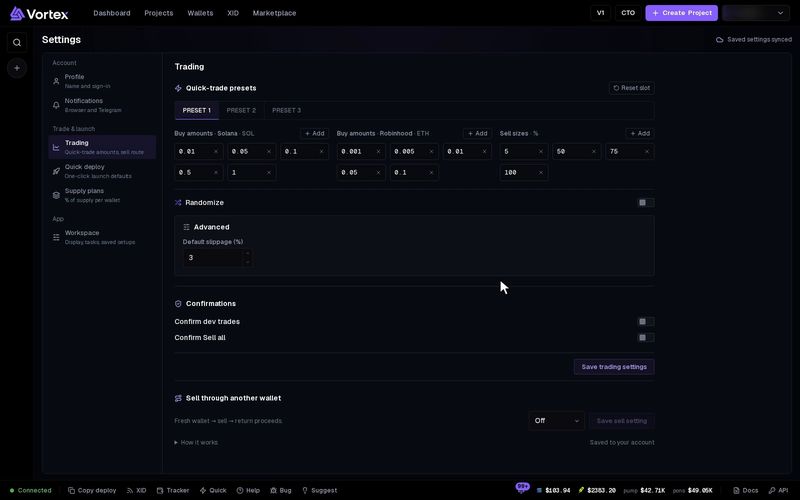
- Open Account settings → Trading.
- Under Confirmations, turn on Confirm dev trades, Confirm Sell all, or both.
- Press Save trading settings.
Both are off by default.
- Confirm Sell all — asks before every Sell all: "Really sell all from … wallets?"
- Confirm dev trades — asks before a quick buy or sell that includes a wallet with the Dev role.
Check a plan before you spend#
- Task Preview — Buy, Snipe, Migrate & Buy, Token Sender and Wallet warm-up can show what they will do. Create the task without Start immediately, then open Preview on its card. Press Recompute after you change a setting. Other tasks have no preview.
- Review & Deploy — check the wallets, amounts and totals.
- Start small — try one small buy, or a launch with a tiny dev buy, first.
- For developers — an API key with Sandbox turned on can only make dry-run calls. Nothing is sent on chain. See API overview & keys.
A task setup saved before simulation was removed shows "This saved setup uses simulation, which is no longer available." Press Use real trading to use it. That setup will then spend real funds.