Referrals
Invite people with your link, see what you earn from their fees, and claim your earnings.
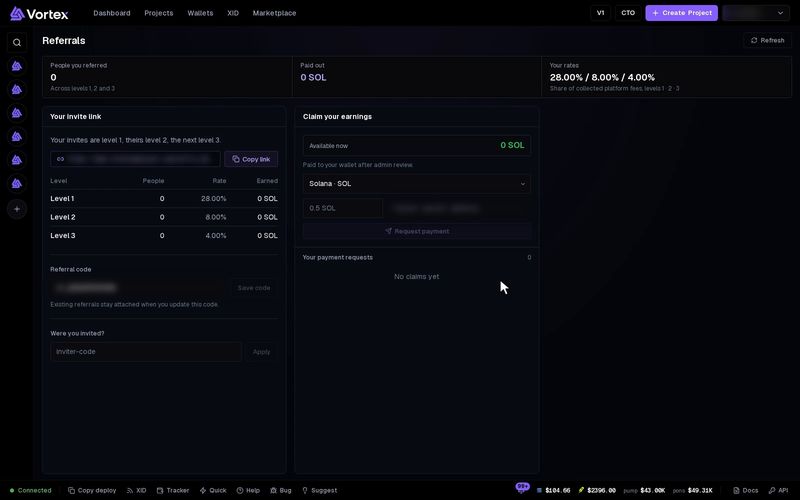
Invite people with your own link. When they pay platform fees, you get a share, and you can claim it to your wallet.
Open Referrals#
- Click your name at the top right. On a phone, open the menu.
- Click Referrals.
Three figures show at the top. Click Refresh to load the latest.
- People you referred — everyone in your network, across levels 1, 2 and 3.
- Paid out — what has been paid to you so far.
- Your rates — your share of the platform fees at level 1, level 2 and level 3.
How the levels work#
- Level 1 — people who joined with your link or your code.
- Level 2 — people your level 1 invited.
- Level 3 — people your level 2 invited.
When someone in your network pays a platform fee, your rate for their level is added to your balance. It is added in the coin the fee was paid in, SOL or ETH. The table under Your invite link shows the People, Rate and Earned for each level. Earned is shown in SOL.
Invite someone#
- Under Your invite link, click Copy link. It changes to Copied.
- Send the link to the person you want to invite.
- They open the link, then sign up or sign in in that same browser tab.
- They become your level 1, if nobody invited them before.
If the link did not work for them, they can type your referral code by hand. See "Were you invited?" below.
Change your referral code#
Your code is the last part of your invite link.
- Type a new code in Referral code. Use 3 to 50 letters, numbers,
-or_. - Click Save code. You see "Referral code saved".
People you already invited stay in your network. But old links with your old code stop working, so share your new link.
Were you invited?#
This box shows only if nobody invited you yet.
- Type the code of the person who invited you.
- Click Apply. You see "Invitation attached".
An invitation cannot be changed or removed later. And once you have invited people yourself, you can no longer add an inviter.
Claim your earnings#
- Under Claim your earnings, pick the chain. Solana · SOL is always there. Other chains show once you earn on them.
- Check Available now. This is what you can claim on that chain.
- Type the amount, and the Payout wallet address on that same chain.
- Click Request payment. You see "Payment request submitted".
Your request is checked by the team before it is paid. You can have one open request per chain at a time.
The payment goes to the address you type. Check it twice before you click Request payment. A payment that went to a wrong address cannot be undone.
Follow your payment requests#
Your payment requests lists each request with its number, its amount and its status:
- pending — waiting for review. Click Cancel claim to cancel it.
- approved — accepted and waiting to be paid. It can no longer be cancelled.
- paid — sent to your wallet. A link to the transaction shows under it.
- rejected — not paid. The amount goes back to Available now.
- cancelled — you cancelled it. The amount goes back to Available now.
Troubleshooting#
"referral code not found" — The code is wrong, or its owner changed it. Ask them for their current link.
"a referral is already attached to this account" — You already have an inviter. It cannot be changed.
"a claim is already pending or approved on this chain" — Wait until your open request is paid. If it is still pending, you can cancel it and ask again.
"invalid payout wallet address" — The address is not a valid address on the chain you picked.