Folders
Sort your pool wallets into folders, open one folder at a time, and act on a whole folder at once.
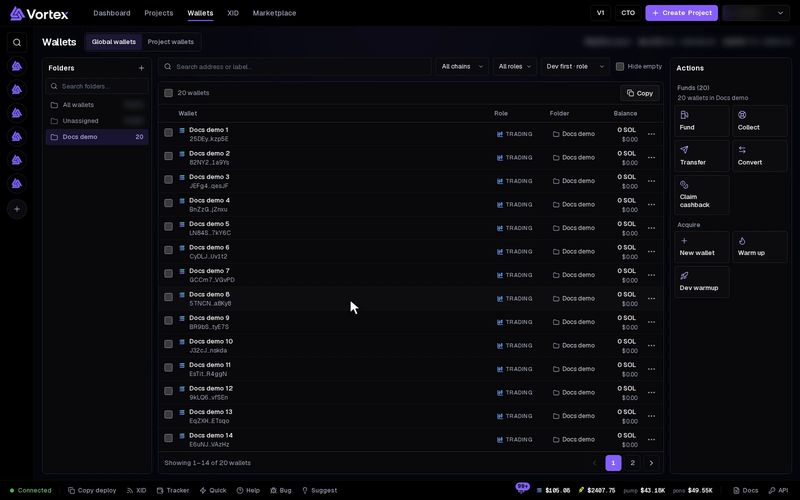
A folder is a named list of wallets, like "Launch A" or "Snipers". Use folders to sort your wallets and to act on one set at a time. Folders never move funds.
Before you start#
- Folders exist only in Global wallets, your wallet pool. In Project wallets the left column lists projects instead.
- A wallet sits in one folder at most. A wallet in no folder is listed under Unassigned.
The Folders column#
On a wide screen, Folders is the left column of the Wallets page. On a narrow screen, press Folders to show it, or pick a folder from the list above the table.
- All wallets — every wallet in your pool.
- Unassigned — wallets that are in no folder.
- Then one row per folder, with its wallet count.
- Search folders finds a folder by name.
Click a row to open that folder. The table then shows only its wallets.
Make a folder#
Press + (New folder) at the top of the Folders column.
Type a name in Folder name…. Up to 64 characters.
Press Enter or the check mark (Create folder).
Each folder name must be different from your other folders.
Put wallets in a folder#
- One wallet: click its Folder cell in the table, then pick a folder. Pick Unassigned to take it out.
- Many wallets: tick them, then use Move to folder in the bar above the table. Unassign sends them back to Unassigned. On a narrow screen these are Assign folder… and Remove from folder in the Actions panel.
- New wallets: open a folder before you press New wallet. The new wallets go straight into it. See Create & import.
A wallet file you saved when you exported keys remembers each wallet's folder. Import it again, and missing folders are made for you.
Wallets you buy in the Wallet Marketplace arrive in a new folder for each order, named Marketplace # and 8 characters of the order ID.
Rename or delete a folder#
Open the folder. Hover over its row to show two buttons. On a touch screen they always show.
- Rename folder — type the new name, then press Enter.
- Delete folder — then press Confirm?.
Deleting a folder keeps every wallet in it. They move to Unassigned.
Folders and projects#
A folder is a label for you. A project is a token launch, and its tasks trade from the project's wallets. One wallet can be in a folder and in several projects at the same time.
Act on a whole folder#
The Actions panel works on the wallets you ticked. With nothing ticked, it works on every wallet in view. So to fund, collect or warm up a whole folder, open it and press the action with nothing ticked. Check the count in Funds (N) before you start.
Copy above the table works the same way: with nothing ticked, it copies every address in view.
Filters and search also limit what is in view. Clear filters shows the whole folder again.