Mixer
Fund or empty your wallets through an exchange, so the chain shows no direct link between them.
A mixer moves SOL through an exchange instead of straight from wallet to wallet. You pay into an order at Husher, an outside service. An exchange (such as Binance) then pays each wallet from its own funds, after a wait you choose. On the chain, your wallets show no direct transfer between them.
There are two ways to use it:
- Fund — one payment fills many wallets. It is one Husher order.
- Collect — many wallets empty into one address. Each wallet gets its own Husher order.
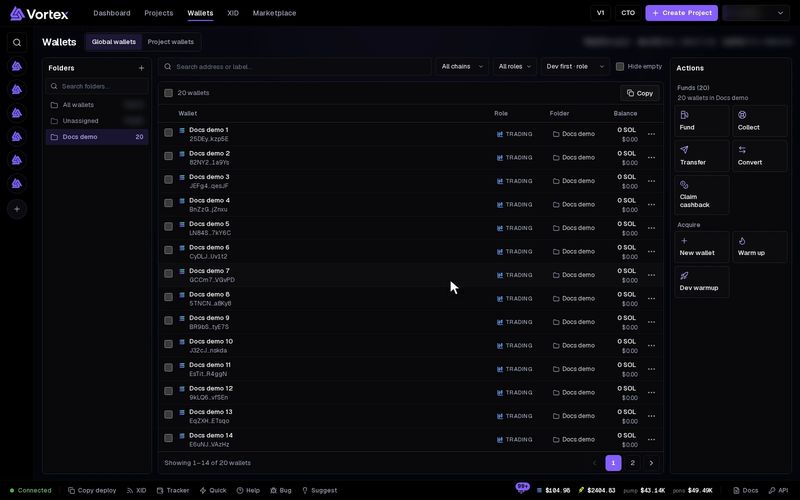
Both start from the Wallets page and run as a Mixer task.
Fund wallets through the Mixer#
- On Wallets, tick the wallets you want to fund.
- In the actions panel, under Funds, click Fund. The Fund wallets window opens.
- Under Method, pick Mixer.
- On Amount and wallets, enter the total. Pick a Distribution: Equal, Custom or Variation.
- Under Fund from, pick one of your wallets, or Deposit address · pay from anywhere to pay from outside. A wallet you fund cannot also be the source.
- Click Next — exchanges & holds. For each wallet, pick the exchange and the Hold (minutes): how long the exchange waits before it pays that wallet. Randomize exchanges and Auto-distribute holds fill these in for you.
- Click Create order (from your wallet) or Create order — get deposit address.
- If you chose the deposit address, send exactly the amount shown under Send exactly to the Husher deposit address.
The last step lists every wallet with its exchange, hold, status and payout. Execute now skips one wallet's hold and pays it out right away. You can close or minimize the window: the task keeps running. A minimized window comes back from the bottom bar.
For the whole window, see Fund wallets.
Collect through the Mixer#
- On Wallets, tick the wallets you want to empty.
- Under Funds, click Collect. The Collect funds window opens.
- Under Method, pick Mixer.
- Pick the Exchange.
- Enter the Destination wallet, or click Use one of my wallets.
- Click Collect via Mixer, check the summary, and click Collect now.
Each wallet sends its SOL into its own Husher order, and the exchange pays the destination. Under Advanced, Delayed collection gives every order a random hold in a range you set. See Collect funds.
Limits#
- Each wallet must get at least 0.15 SOL when you fund (0.01 ETH on Robinhood). When you collect, wallets with less than 0.15 SOL are skipped.
- Exchanges on Solana: Binance (default), KuCoin, Bitget. On Robinhood: Husher (default), KuCoin, ChangeNOW, SideShift.
- Collecting through the Mixer works on Solana only. Funding works on Solana and Robinhood.
- A hold can be 0 to 1,440 minutes (one day).
- The task follows the orders for 4 hours by default (Watch for). Husher keeps working on them after that.
What it costs#
There is no platform fee on Mixer orders. Husher's fee comes out of each payment, so each wallet receives a bit less than its share. The amounts the window shows are before that fee. Network fees apply to the payments you send.
Once SOL reaches a Husher deposit address, you cannot cancel it from here. Send exactly the amount shown, to the address shown, on the right chain. Double-check a collect destination: a wrong address loses the funds. Never collect straight to an exchange deposit address. Send to a wallet you control first. See Real funds & confirms.
If no payment reaches the deposit address in time, the task stops with a time-out. Its Deposit section then says Nothing moved. The address still belongs to the task: pay it, then press Start on the task to go on. Run again on a Mixer only pays wallets that have not been paid yet. See How tasks run.
All settings#
These are the task's own settings, as Edit shows them on its card. The Fund and Collect windows set them for you.
Every option on the Mixer form
solana · robinhood onlymixer- Modechoicedefault Fund — one source → many destinations (one order)Fund — one source → many destinations (one order)Collect — many sources → one destination (unique order each)
- Source walletwalletoptionalDeposits the whole total into the Husher order. Leave EMPTY for the deposit-address flow: the task shows Husher's address and you pay it from anywhere.
- DestinationswalletsEach receives its share out of the exchange (≥ 0.15 SOL each).
- Total SOLnumberdefault 0.5 SOLHusher takes its fee out of this; recipients get the rest (≥ 0.15 SOL / 0.01 ETH each).
- Distributionchoicedefault Equal splitEqual splitRange (±%)
- Range variationnumberdefault 20 %0–90 %
- Source walletswalletsEvery source opens its OWN Husher order to the destination — no shared order links them.
- Destination walletwalletoptionalThe one managed wallet that receives every order — or leave empty and give an external address.
- External destinationtextoptionalAny Solana address (used when no destination wallet is picked).
- Amount per sourcechoicedefault Max — whole spendable balanceMax — whole spendable balanceFixed SOL each
- Amountnumberdefault 0.2 SOL
- Exchangechoicedefault BinanceBinanceKuCoinBitget
- Payout holdnumberdefault 0 min0–1440 minHow long the exchange holds before paying out. 0 = as soon as funds confirm. Per-destination exchange / hold overrides are set from the Fund wallets modal.
- Delay between ordersnumberdefault 2000 ms
- Delay jitternumberdefault 0 %0–90 %
- Watch fornumberdefault 240 min1–1440 minHow long the task follows the orders; Husher keeps processing after it stops watching.
- Stop after repeated errorsnumberdefault 3