Migrate & buy
Plan a pump.fun launch that fills its curve, moves to PumpSwap and buys there, all in one bundle.
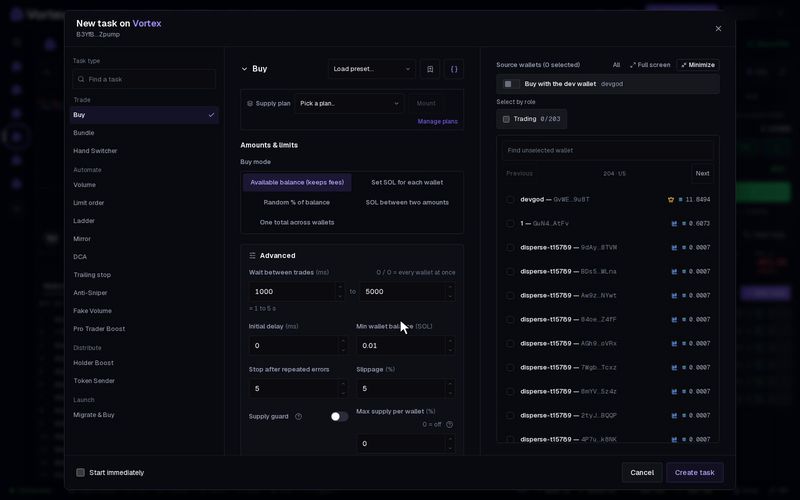
Migrate & Buy plans a new pump.fun token that skips the bonding curve stage. It creates the token, buys the whole curve so the token migrates at once, and then buys on PumpSwap. Solana only.
The platform has not switched on real sends for this task. If you press Start, the task fails before it sends anything. No token is made and no SOL is spent. You can still build the task and read its Preview.
What it would do on-chain#
All steps go in one Jito bundle, so they all land together or none do.
- The first wallet you pick is the dev wallet. It creates the new token.
- The dev wallet buys the whole bonding curve. That fills the curve, so the token is ready to move.
- The dev wallet moves the token to a PumpSwap pool.
- Your other wallets buy the token in that pool.
A bundle holds at most 5 transactions. The first three are fixed, so at most two transactions of buyers fit.
Set up Migrate & Buy#
- Upload your token's details as a JSON file to IPFS, a public file store, and copy its link. The app does not upload it for you.
- Open any token in the terminal. In Tasks, press New task. The task makes its own new token, so the open token is not used.
- Under Task type, pick Migrate & Buy in the Launch group.
- Fill in Token name, Symbol and Metadata URI.
- Set PumpSwap buy.
- Pick at least two wallets. The first is the dev wallet. The rest are buyers.
- Press Create task, then open Preview.
Key settings#
- Token name — 1 to 32 characters.
- Symbol — 1 to 16 characters.
- Metadata URI — the IPFS link to the JSON file you uploaded. See metadata URI.
- PumpSwap buy — the total SOL your buyers spend after the move, split evenly between them. At least 0.001 SOL.
- Per-buyer SOL (optional) — set each buyer's amount yourself instead of an even split.
- Mayhem mode — the pump.fun launch option of the same name. Off by default.
- Buyers / tx (under Advanced) — how many buyers share one transaction, 1 to 3. Default 1.
- Dev-buy slippage and PumpSwap slippage (under Advanced) — default 15% each.
- Jito tip (under Advanced) — default 0.002 SOL.
What the Preview shows#
Preview lists the plan and sends nothing:
- Dev full-curve buy — the SOL the dev wallet needs to fill the curve. On pump.fun this is tens of SOL.
- Dev balance — whether the dev wallet can cover it.
- Buyers — how many buyer wallets have enough SOL.
- Total plan cost — the curve buy, the buyer buys and the tip together.
- Bundle size — the number of transactions against the limit of 5.
- Real send — while it reads "dry-run only", a real start is refused.
To launch a token today, use the launch wizard. See Create a project.
Every setting#
Every option on the Migrate & Buy form
solana onlymigrate_and_buy- Token nametextrequired1–32 chars.
- Symboltextrequired1–16 chars.
- Metadata URItextrequiredIPFS JSON URL (uploaded by you).
- PumpSwap buynumberrequiredTotal SOL bought post-migration, split across buyer wallets.
- Per-buyer SOL (optional)per-wallet amountExplicit split; empty ⇒ even split.
- Buyers / txnumberdefault 11–3
- Dev-buy slippagenumberdefault 15 %0.01–100 %
- PumpSwap slippagenumberdefault 15 %0.01–100 %
- Mayhem modetoggledefault off
- Jito tipnumberdefault 0.002 SOL
- Confirmation time limitnumberdefault 30000 ms1000–120000 ms