Hand Switcher
Move a token from some of your wallets to others, one sell and one matching buy at a time.
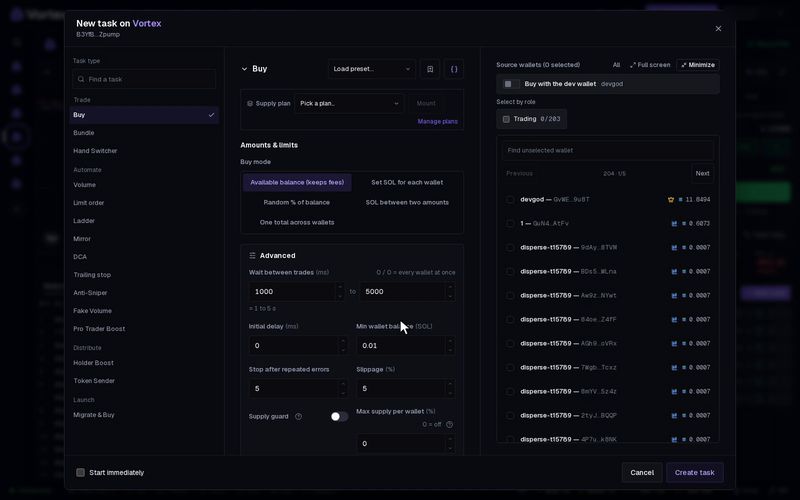
The Hand Switcher moves a token from one group of your wallets (the sellers) to another group (the buyers). In each round, one seller sells and one buyer buys about the same amount, in the same bundle. Use it to spread your tokens over more wallets and add trades to the chart. The price ends each round close to where it started.
Before you start#
- It works on Solana only.
- Seller wallets must hold the token.
- Buyer wallets pay with their own SOL. Each one needs at least Min buyer SOL (0.1 SOL by default), plus enough for the buy and its fees. See Fund wallets.
Set it up#
- Open the token's terminal and click New task on the Tasks panel.
- Under Task type, pick Hand Switcher. It is in the Trade group.
- Set Choose sellers from: Custom wallets, Role wallets or Role + custom.
- With custom wallets, tick them under Seller wallets — sell tokens, receive SOL.
- With a role, pick the Seller role. Every wallet with that role sells.
- Set Choose buyers from the same way. Custom buyers are ticked under Buyer wallets — spend SOL, receive tokens.
- Set Spend limit per buy.
- Click Create task. To start right away, tick Start immediately and click Create & start.
To add the token's dev wallet, turn on Dev wallet sells or Dev wallet buys. The form and the card work as for every task: see How tasks run. The card's Who sells and who buys section shows both sides.
How a round works#
- The task picks one seller and one buyer at random.
- The buyer buys for up to Spend limit per buy. It always keeps a little SOL back (the SOL reserve).
- The seller sells the number of tokens that buy should get. If it holds fewer, it sells what it has, and the buy gets smaller to match.
- Both trades go out together, with a Jito tip. They land together or not at all.
- The task waits a random time (1 to 5 seconds by default) and starts the next round.
Before each round, the task prices both trades. If the buy would cost more than twice the Slippage above what the sell brings back, it tries a smaller round. If that still costs too much, it tries another pair of wallets and sends nothing for this one.
It runs until no seller holds tokens or no buyer has enough SOL, or until you press Stop. A wallet on both sides only sells. A wallet that gets the role later joins in.
Settings that matter#
- Spend limit per buy — the most one buyer spends in one round. Default 0.05 SOL. Not a total budget; fees come on top.
- Wait between trades (Advanced) — the pause between rounds, picked at random between the two numbers. Default 1,000–5,000 ms.
- SOL reserve (Advanced) — SOL each buyer keeps back. Default 0.03–0.1 SOL.
- Min buyer SOL (Advanced) — a buyer with less SOL than this sits out. Default 0.1 SOL.
- Jito tip (Advanced) — paid once every round. Default 0.001 SOL.
- Max supply per wallet (Advanced) — a buyer that already holds this share of the supply sits out. 0 = off.
- Stop after repeated errors (Advanced) — the task fails after this many errors in a row. Default 10.
Each round is two real trades. Together they pay the Jito tip, network fees, the pool's trading fee on both sides, the platform fee and some price impact. Over many rounds this adds up. Trades that landed cannot be undone. See Real funds & confirms.
In the first seconds after a launch the price moves very fast. A round can then sell clearly more tokens than its buy gets back, and the difference stays in the pool. Let the first rush of trading pass before you start a Hand Switcher.
All settings#
Every option on the Hand Switcher form
solana onlyhandswitcher- Choose sellers fromchoicedefault Custom walletsWhere the sellers (the source of supply) come from: wallets you pick, every wallet carrying a role, or both.Custom walletsRole walletsRole + custom
- Seller rolewallet rolerequiredEvery wallet with this role sells — read again each cycle, so a wallet given the role later joins.
- Seller wallets — sell tokens, receive SOLwalletsrequiredWallets that sell (source of supply). Buyers are marked and unavailable here. Deselect a wallet from its current side to switch sides.
- Choose buyers fromchoicedefault Custom walletsWhere the buyers come from: the task wallets you pick above, every wallet carrying a role, or both.Custom walletsRole walletsRole + custom
- Buyer rolewallet rolerequiredEvery wallet with this role buys — read again each cycle, so a wallet given the role later joins.
- Spend limit per buynumberdefault 0.05 SOLMaximum for one buyer in one cycle, not a total task budget. Fees are additional; the reserve can reduce the amount.
- Shortest wait between tradesnumberdefault 1000 ms
- Longest wait between tradesnumberdefault 5000 ms
- Min SOL reservenumberdefault 0.03 SOL
- Max SOL reservenumberdefault 0.1 SOL
- Min buyer SOLnumberdefault 0.1 SOL
- Jito tipnumberdefault 0.001 SOL
- Slippagenumberdefault 10 %0.01–50 %
- Max supply per walletnumberdefault 0 %0–100 %Hard ceiling: a wallet already holding this % of supply is skipped instead of buying more. A mounted supply plan sets it. 0 = off.
- Stop after repeated errorsnumberdefault 10
- Confirmation time limitnumberdefault 30000 ms1000–120000 ms
Troubleshooting#
- "no seller wallet holds this token" — pick sellers that hold it.
- "no eligible buyer" — every buyer has less than Min buyer SOL, or already holds Max supply per wallet. Add SOL to the buyers or lower the setting.
- "all eligible wallet pairs exceed the cost limit" — the pool is too thin for these rounds. Lower Spend limit per buy, or wait for more trading.
- "no tradeable pool for this mint" — the token has no pool the task can trade yet.