Trailing stop
Follow the market cap up and sell once it drops a set percentage from its highest point.
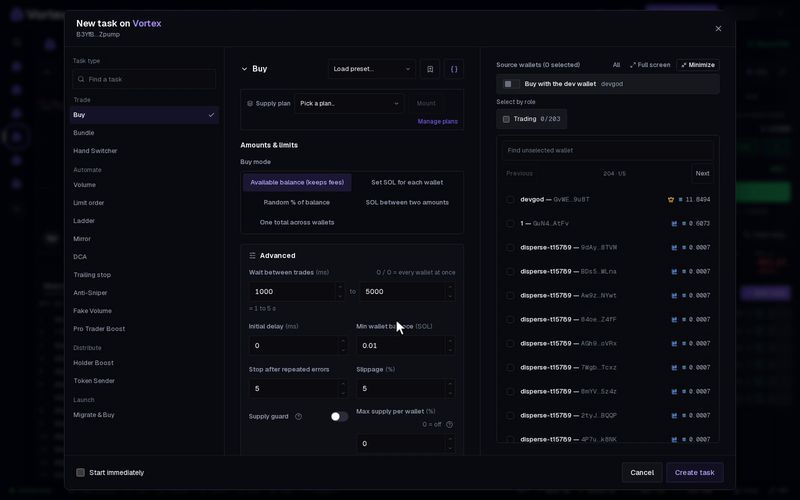
A trailing stop follows the market cap up and sells when it drops a set percentage from its highest point. While the price climbs, your sell level climbs with it. When the price turns and falls far enough, the task sells. You keep most of a rise without guessing the top.
Set it up#
- Open the token's terminal and click New task on the Tasks panel.
- Under Task type, pick Trailing stop. It is in the Automate group. It only sells.
- Set Drop from peak in %. Default 20.
- Optional: set Start tracking above market cap in USD.
- Choose the Amount type and the Amount per trade.
- Set Wallets to use to Every wallet if all the ticked wallets should sell (see the warning below). Then tick the wallets in the list.
- Click Create task, or tick Start immediately and click Create & start.
The form and the card work the same for every task: see How tasks run. The card's Orders section shows the live market cap while the task waits.
How it works#
- The task keeps the highest market cap it has seen since it started: the peak.
- When the market cap falls Drop from peak % below that peak, it sells once and the task ends.
- Example: with 20 %, the market cap climbs from $80,000 to a peak of $150,000. It sells when the market cap falls to $120,000 or lower.
- With Start tracking above market cap, nothing sells until the peak has reached that number. Use it to wait for a rise before the stop counts.
- The first check never sells. The peak starts at the market cap when the task starts.
Settings that matter#
- Drop from peak — how far below the peak, in %, the task sells. From 0.1 to 99. A small number sells on a small dip. A large one gives the price more room but sells lower.
- Amount type — % of tokens held (the default) or % of supply.
- Amount per trade — the amount for each wallet. Default 100, which sells everything each wallet holds.
- Wallets to use — which of the ticked wallets sell. The default is Take turns.
- Minimum market cap and Maximum market cap — only watch inside this range, in USD. Empty = no limit.
- The dev wallet stays out unless you turn on Sell from the dev wallet.
The task sells once and ends. With the default Take turns, that one sell uses one wallet: the next in turn. The other wallets keep their tokens. To sell from all the ticked wallets, set Wallets to use to Every wallet. See Real funds & confirms.
When the drop is reached, the task sends a normal market trade. In a fast fall the price can be lower by the time it lands, within your Slippage. The trade pays network fees and the platform fee, and it cannot be undone.
All settings#
Every option on the Trailing stop form
trailing_stop- Drop from peaknumberdefault 20 %0.1–99 %Sell when the market cap falls this much from the highest point seen since tracking started.
- Start tracking above market capnumberoptionalThe peak must reach this before the trail counts; empty = trail from the start.
- Amount typechoicedefault % of tokens held% of tokens held% of supply
- Amount per tradenumberrequireddefault 100 %0.000001–100 %Amount for each wallet, using the amount type above.
- Wallets to usechoicedefault Take turnsChoose which selected wallets trade each time.Take turnsRandom walletBiggest holderSmallest holderRichest walletEvery wallet
- Minimum market capnumberoptionalTrade only while the market cap is above this; empty = no floor.
- Maximum market capnumberoptionalTrade only while the market cap is below this; empty = no ceiling.
- BudgetnumberoptionalThe most the task may spend (buys) or receive (sells); empty = unlimited.
- Maximum trade roundsnumberoptionalStop after this many trade rounds. Leave empty for no limit.
- Start delaynumberdefault 0 msWait this long before the first trade.
- Run fornumberoptionalEnd this long after the start delay; empty = until done.
- Max supply per walletnumberdefault 0 %0–100 %Hard ceiling: a wallet already holding this % of supply is skipped instead of buying more. 0 = off.
- Slippagenumberdefault 5 %0.01–50 %
Troubleshooting#
- "… of … wallet trades confirmed; remaining trades failed or need reconciliation" — some wallets traded and some did not. The task stops. Check the wallets' balances before you start it again, so the ones that already traded do not trade twice.
See also#
- Limit order — sell at a fixed level
- Ladder
- How tasks run