OTC Desks pairing
Pair a Pump.fun launch with OTC Desks so its creator fees pay your holders a reward.
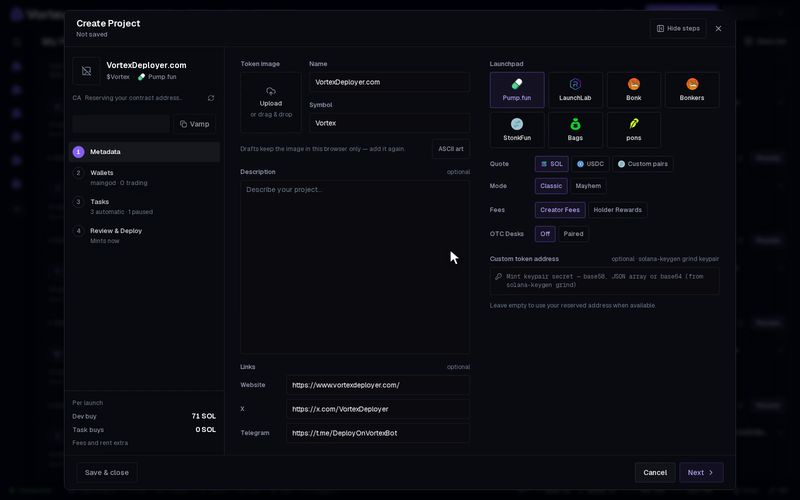
OTC Desks is a separate site, otcdesks.cash. When you pair a token with it, the token's creator fees go to OTC Desks instead of your wallet. OTC Desks uses them to pay your holders a reward, such as a tokenized stock.
Once the token launches, all of its creator fees go to OTC Desks for good. You cannot point them back to your own wallet.
Before you start#
The OTC Desks row shows only when all of these are true:
- The launchpad is Pump.fun.
- The Quote is SOL. See Pair tokens.
- Fees is set to Creator Fees. Holder Rewards cannot be paired.
Turn it on#
You find the row under Fees on step 1 of the wizard, in the Quick deploy window, and in Settings → Quick deploy.
- Set OTC Desks to Paired. The default is Off.
- Under Reward, pick Single for one reward, or Basket (2–5) for two to five.
- Click a reward chip, or find more under More rewards….
- Or click Mint, paste the address of any Solana token, and click Use. It is added to the OTC Desks community list first. If OTC Desks refuses it, you see why right away.
Community tokens and rewards that are not listed yet work only as a Single reward.
The line below starts with "Holders earn". It names your reward and shows how OTC Desks splits the creator fees between holders and its own uses.
Limits#
OTC Desks takes an X link of at most 120 characters. With a longer one, the app refuses the paired launch before anything is sent. The name, symbol and description limits of Token details already fit OTC Desks.
The app also refuses a paired launch while otcdesks.cash is not answering. Try again in a few minutes, or launch without pairing. This check applies when you press Create, Schedule or Deploy. A launch that is already scheduled, and the later launches of a batch, go ahead without it.
What happens at launch#
- If you left Website empty, the token's OTC Desks page becomes its website. A website you typed is kept.
- The token launches like any Pump.fun launch, with its dev buy and tasks.
- Right after, the creator wallet sends one more transaction. It routes the creator fees to OTC Desks.
- The token registers on OTC Desks. Its page shows up there within about a minute.
The pairing transaction pays a small network fee and rent from the creator wallet. Without enough SOL it fails.
Check the pairing#
The project's tile on Projects has an OTC Desks line:
- Pairing… — the pairing has started.
- Fees routed · registering… — fees go to OTC Desks. The token is being listed.
- Paired — done. The line turns into a link to the token's OTC Desks page.
- Pairing failed — hover the line to see why.
The launch result shows the same state. A failed pairing never stops the token itself. It trades as normal, but it is not listed on OTC Desks:
- If the fee transaction failed, the fees still go to your creator wallet.
- If the fee transaction landed and only the listing failed, the fees already go to OTC Desks.
Troubleshooting#
- The OTC Desks row is missing — check that you picked Pump.fun, a SOL quote and Creator Fees.
- "OTC Desks limits the X link to 120 characters" — shorten the X link.
- "otcdesks.cash is not answering right now" — wait a few minutes, then press Create again.