 Solana
 Robinhood Chain
Launch a token.
Trade it from all your wallets.
Seven launchpads on two chains. Create and fund wallets in bulk, trade from all of them on one terminal, and let tasks buy, sell and trade for you. Or drive it all from the API and your AI agent.




01Launch
Seven launchpads.
One click to launch.
Set a token up in the four-step wizard, or save your setup as a preset once. After that, Quick Deploy launches from any page with a name and a click.

Two chains, seven launchpads
Pump.fun, Raydium LaunchLab, Bonk, Bonkers, Bags and StonkFun on Solana. pons on Robinhood Chain.
Quick Deploy
Three presets, each a full launch setup. Pick one, type a name, press Deploy.
Bundle at launch
On Solana, the token is made and your wallets buy in the same bundle. If the bundle does not land, the token is not made either.
Launch tasks
Tasks that start the moment your token goes live, up to 20 in a preset.
02Wallets
Every wallet,
ready in one run.
Make as many wallets as you need, fund them all from one amount, and watch every balance live.

Create or import in bulk
There is no upper limit on how many you make in one go. Import your own keys too; every key is kept encrypted.
Fund them in one run
Send one amount and the app splits it across your wallets: equal, custom, or with a variation you set in %.
Vortex Disperse
Short-lived in-between wallets pay each of your wallets, so they are not paid straight from one shared wallet.
Live balances
Every wallet’s balance is live in the wallet table, in SOL or ETH, next to its role and label.
03Trade & tasks
Trade from every wallet.
Let tasks run the rest.
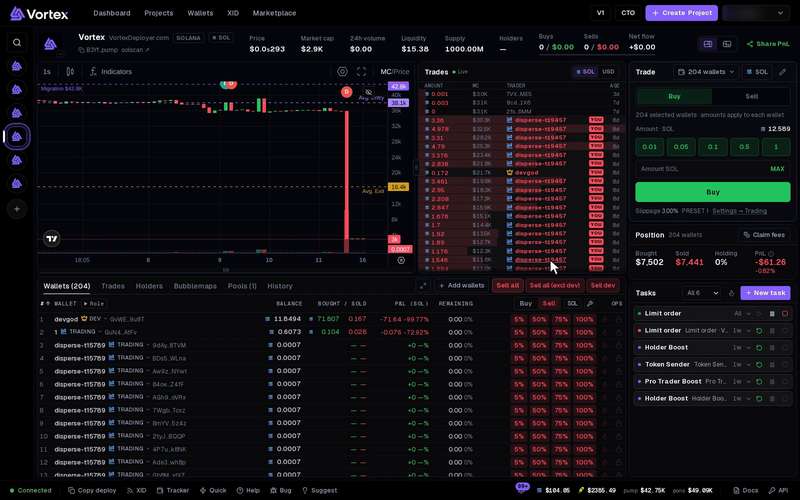
Each token’s terminal shows the chart, live trades, your wallets, your position and the tasks running. Buy and sell from one wallet or from all of them, and add tasks that buy, sell or trade for you while you watch.

Volume
Only buys or only sells on a timer, or fast random buys and sells, each with a wallet and a size picked at random.
Ladder and DCA
Limit orders at evenly spread market-cap levels, or the same amount on a timer, bit by bit.
Mirror
When someone buys your token, your wallets sell. Or the other way round: when someone sells, your wallets buy.
More tasks
04Wallet Marketplace
Wallets that look
lived-in today.
Buy ready wallets when you need them: some hold funds, some are weeks old with real trades, and some are dev wallets that have already launched tokens.

Funded, aged or dev
Funded Solana wallets hold a USDC balance you keep. Aged wallets on Solana or Robinhood have a trading history.
A funding gap you choose
Set a funding gap from 30 minutes to 6 hours: any two wallets you pick were funded at least that far apart, so they do not look related.
One clear price
Total to pay is everything you send. Nothing is added on top, and the balance inside becomes yours.
In the API too
Your own code or AI agent can buy wallets from the Wallet Marketplace.
05Developers & AI agents
Your code can do
what the app does.
The API lets your own code or an AI agent buy, sell, launch tokens, run tasks, read your wallets and PnL, and buy wallets from the Wallet Marketplace.
curl -s https://api.vortexdeployer.com/api/v1/me \
  -H "Authorization: Bearer vd_…"
Your first call: GET /me tells you who owns the key and what it may do.

REST API
Keys scoped to read, trade, launch and stream, each with an optional max per buy and daily cap.
Read the guideWebSocket streams
One socket, many topics. txs is every trade the platform sees, on every token; others carry your PnL, wallet balances and tasks.
Read the guideMCP server
93 tools, one per REST call, with the same scopes and limits. For Claude, Cursor or any MCP client.
Read the guide
For your AI agent
Which chains and launchpads can I use?
Two chains: Solana and Robinhood Chain. On Solana you launch on Pump.fun, Raydium LaunchLab, Bonk, Bonkers, Bags or StonkFun; on Robinhood Chain, on pons. Bundle, Hand Switcher, Fake Volume and Migrate & Buy run on Solana only.
Chains & launchpadsWhat can tasks do?
A task is a job your wallets do on one token, such as buying it, trading it or guarding it: Volume, Ladder, DCA, Mirror, Limit order, Trailing stop, Anti-Sniper and more. You set it up once, start it, and follow every trade in its log. Launch tasks start the moment your token goes live.
How tasks runCan my AI agent use VortexDeployer?
Yes. Create an API key and connect any MCP client, such as Claude or Cursor, or your own code. The MCP server has 93 tools, one per REST call. You choose the key’s scopes (read, trade, launch, stream) and can cap it with a max per buy and a daily cap.
Connect with MCPHow do I sign in?
Open the app and press Continue with Telegram: the VortexDeployer bot (@DeployOnVortexBot) signs you in, and new accounts are made there. There is no sign-up form in the browser. Accounts that have unlocked browser sign-in can also use a username and password.
Sign in & accountsIs there a test mode?
No. Launches, trades and transfers use real SOL or ETH, and they cannot be undone. Some tasks offer a Preview that checks the plan and sends nothing.
Real funds & confirmsWhat does it cost?
A platform fee on each buy and sell your wallets make: 2% to start, down to 0.8% as the fees you have paid add up. There is no subscription.
Platform fees & tiersFrom sign-in
to your first launch.
Start here walks you through it step by step: sign in with Telegram, make and fund your wallets, then launch your first token.